
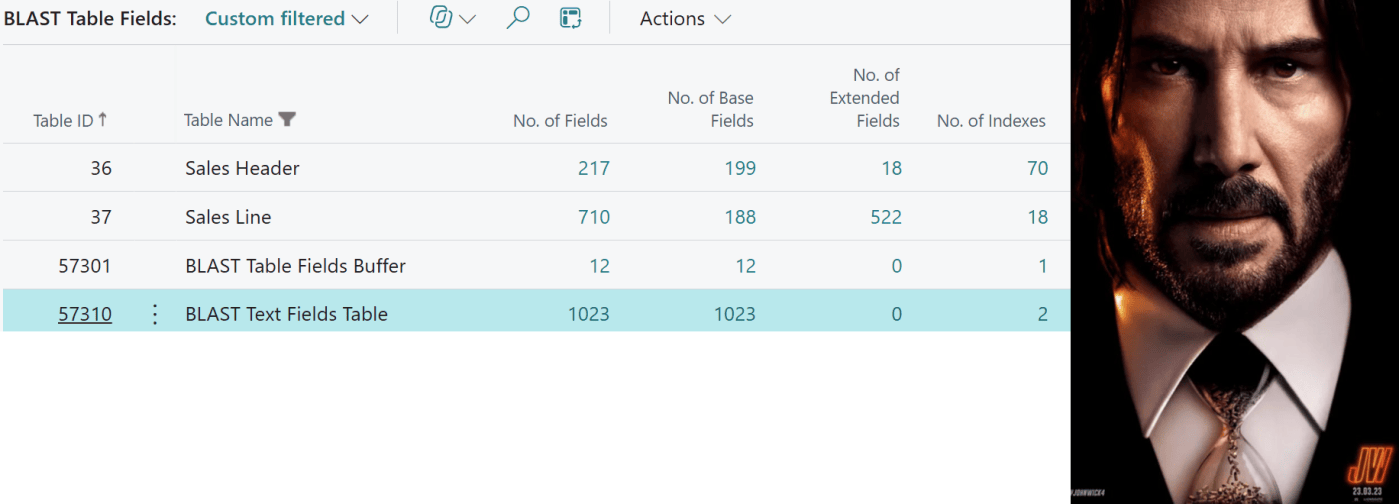
Dynamics 365 Business Central 2026 Wave 2, version 29, comes with no join to Table Extension ($ext). All 3rd party app fields are now part of the base table.
And so, the circus begins (Venite gente !!!) and myths and legend start to pop up here and there. Like Baba Yaga.
Let’s debunk all of these myths with a practical proof of concept. You can download it here:
DT.AL/DT.FieldBlast at main · duiliotacconi/DT.AL · GitHub
Just deploy the extension in a Dynamics 365 Business Central 2026 Wave 2 (version 29) sandbox, search for “BLAST Table Fields” list and apply this filter to Table Name (without double quotes):
“BLAST*|Sales Header|Sales Line”

Then you can play with the actions to include/exclude FlowFields and/or include/exclude Table Extensions.
You got the points? No?… REALLY?
- How many fields I could define in a Table, until I get an error?
1018
Consider 6 system fields as always added by the platform (timestamp, $systemId, SystemCreatedBy, SystemCreatedAt, SystemModifiedBy, SystemModifiedAt) then you have 1024 – 6 = 1018 Fields that can be part of the Table definition. 1024 is the maximum column definition allowed by SQL Server.
Below proof that it works (I stopped at 1023):

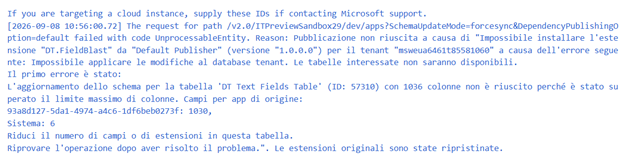
And the error that you receive if you try to modify an already existing Table Structure and try to add more than 1024 columns
If you have 1.000+ fields in a table, you need a good doctor. A very good one.

- What about the famous and scary SQL Server 8KB size limit for a Table Record?
There are different data types in SQL Server. Some are primitives, strictly defined in their storage occupancy while others do not have a strict size definition and can span (far) more than 8KB. This was existing since every version of Dynamics 365 Business Central (and previously in Dynamics NAV).
How could I explain this easily?…
AL Integer, Decimal, Boolean and others have their equivalent in SQL Server as primitives and as such these are strictly contributing to the definition of table size.
Text and Code they don’t. They are SQL NVARCHAR, hence their data can be of super large dimension, and SQL just contains a sort of pointer where to look for that data.
If you want to know more in deep about the 8KB limit, see:
Maximum Capacity Specifications for SQL Server – SQL Server | Microsoft Learn

SQL Server record size: How many fields is too much?
Another edge case of an overflowing record in a SQL table
NOTE: there are also a couple of compiler warning in VS Code and you will fumble in them also while compiling the proof of concept app:
Compiler Warning AL0914 – Business Central | Microsoft Learn
c:\app\DT.FieldBlast\src\Fields\BLASTTextFieldsTable.Table.al(3,14): warning AL0914: Table ‘BLAST Text Fields Table’ has 906 fields. Tables with many fields might limit the ability of other extensions to add fields, as the total number of fields across a table and all its extensions cannot exceed the maximum number of columns allowed in SQL.
Compiler Warning AL0915 – Business Central | Microsoft Learn
c:\app\DT.FieldBlast\src\Sales Line\BLAST2SalesLine.TableExt.al(5,22): warning AL0915: Table extension ‘BLAST2 Sales Line’ adds 200 fields to table ‘Sales Line’. Adding many fields in a single table extension might limit the ability of other extensions to add fields, as the total number of fields across a table and all its extensions cannot exceed the maximum number of columns allowed in SQL.
NOTE: If you have reached or close to reach the 8K limit in a table, you need a good doctor. A very good one.
- I am not good at SQL. Can you explain to me, for example, how many times I can clone e.g. Sales Line structure before I get an error?
If you (d)ucks at SQL, I do not blame you (not my business, how you grow up…).
So, let’s say that you clone Sales Line data structure that currently contains e.g. 190 fields and create a table extension with this number of fields and same data type.
Deploy Sale Line Extension 1, that adds 190 fields of different types. It works.
Now. Do the same another time.
Deploy Sales Line Extension 2 that has other 190 fields. It still works.
Now… STOP. Don’t push too far your luck. I tell you in advance that if you do this another time it breaks with the following SQL error:

BUT. If you just take half of the fields in Sales Line and deploy it… It works just fine.
In short, you can tell your friends and family (cats, dogs and red fishes included) that
You can extend Sales Line table by cloning it more than 2.5 times!
(but please don’t do it…)
Below is the proof of concept with 190 Base Fields + 521 Fields from Table Extensions:

In the end, you have 711 fields to maintain. Happy?
NOTE: If you have extended sales line with 2.5 times the number of fields, you need a good doctor. A very good one.
- Eh… But then developers will create Comment as Text[1024], Comment2 as Text[1024], etc.
No problem at all. If your dev still lives in the 90s, we’ll meet at the next Spandau Ballet concert for sure.
Jokes apart. In the proof of concept, I have deployed a Table Extension with 100+ Fields as Text [2048]. And it deploys beautifully.
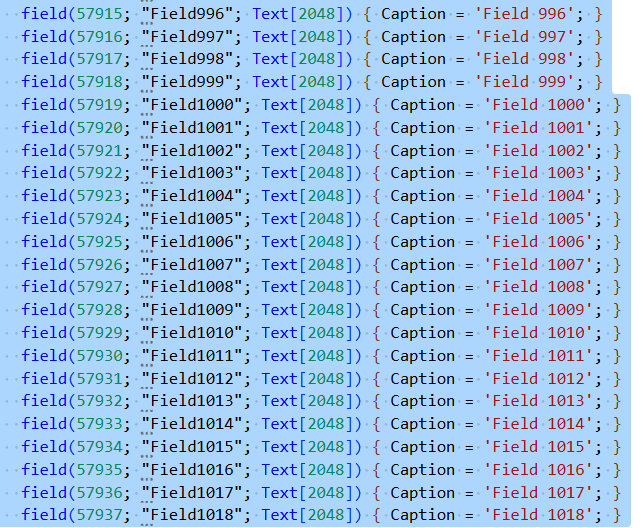
NOTE: If you have extended a table with 100 Fields as Text[2048], you need a good doctor. A very good one.
- The limit of Keys that you can define in AL is 40.
FALSE
SQL Server is allowing the creation of 999 Indexes.

[FUN FACT, if you invert the maximum number of Indexes in SQL, you have exactly the number of the beast… brrrr]
But the old CSIDE restricted the number of Keys (SQL Indexes) to 40.
This is not true anymore (and I think since a while now, cannot tell you since when – Never created up to 40 Indexes… -). I have created a Pull Request to amend the documentation in relation of this limit.
The proof of concept is also deploying 70 Keys with a random combination of only base app fields, only table extension fields and a mix of Base Table and Table Extension fields.

NOTE: If you have tables with 40+ Keys, you need a good doctor. A very good one.
- Is it possible to mix Base Table fields and Extension Fields in an Index?
TRUE
As per point 5., the Proof of concept contains Keys with a blend, a mix from the base table with the extension. Can’t say about the corners cases that have been found but, for me, now THIS is largely possible.
The proof of concept demonstrate that this is true, but someone already finds out some platform combination that adds constraints on creating indexes from different extensions that I want to rephrase here:
- A key cannot reference a field from a Table Extension in a different app than the base table
- A key cannot reference a same-app sibling extension with a higher Object Id than its own (weird)
Considering base table and your extension fields, it is generally and genuinely true. Now that everything is in one single table, limitations and constraints are just an AL artifact that, I hope, Microsoft will resolve/improve in later versions.
CONCLUSION
From the Armageddon version – Dynamics 365 Business Central 2026 Wave 2, version 29.x – I have extracted the BABA YAGA, the John Wick of the platform features that was long awaited: merging table extensions fields into base table and clarified several important points.
To sum up:
- How Many Fields Can be declared in a Table + Table Extension? 1018
- Is it possible to mix Base Table fields and Extension Table fields in the same Key? Yes
- Do we have a limit of 40 Keys to be created? False
- Do we have a hard limit for 8K in Record Dimension? Yes BUT you have to consider the corresponding SQL Data Type of every AL Data Type. Better taking care of your Table design, and extensibility. You cannot pretend all your database being a big table, otherwise go back to your Excel workbook!
- I am No good in SQL (but I am very good in KISS), how far I could push my table definition? Imagine taking Sales Line structure, clone it 2.5 times and deploy. That would be possible. (Please, do it on Friday afternoon and then close your laptop and leave the building… for an unknown destination. And for the lifetime)

Post Scriptum
If you have any further myth to bust, just shoot me an email or find me on LinkedIn and I will try my best to crack it.


Leave a Reply