
Exactly when the biggest Armageddon version has been announced in preview (potentially known as Dynamics 365 Business Central 2026 Wave 2, v29), I have spitted blood on a performance problem related to one of the coding pillars for performance: partial records (SetLoadFields and friends).
Everyone knows – or thought to know – that it is safe to add SetLoadFields to a record, if this is not manipulated by any other source code that might cause JIT (Just In Time) loading of the entire record.
The benefits are under the sun: reduce the number of query fields, remove useless JOIN predicates – if table is extended and before v29 -, avoid key lookup on Primary Key, etc.
But even if there are no JIT loads error and, on the chart, it seems that you are adding a simple performance optimization, there is always the shadow of missing caching by the platform behind the scenes. (DOH!)
What the most of us – me first and/or included – wants is to be sure that it won’t cause any performance regression, aside the one described above.
But life is so cruel… JIT loading is not the only regression that you have to think about when using SetLoadFields. You also have to think about caching (sigh).
When using partial records, the caching mechanism is somewhat… hardly invoked (or not working at all).

One simple example: standard Report 152 “Calculate Low Level Code”. That is just a façade to call Codeunit 3687 “Low-Level Code Calculator”.
This Codeunit retrieve Item Production BOMs (procedure PopulateFromItemAndRelatedBOMs ).
Let’s start with a due first comment on the utilization of the standard query used to retrieve item Production BOMs. And I underline “due” because if it was different, I would have not investigated this issue (since there might have not been any sensible performance issue).
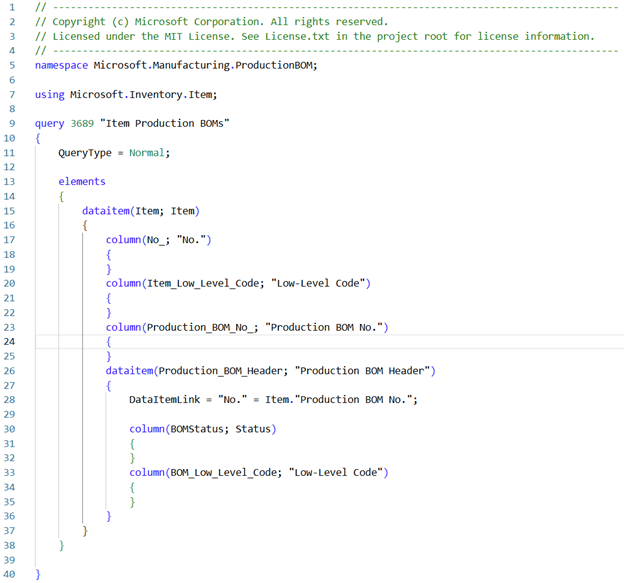
The query to retrieve Item Production BOMs is the following
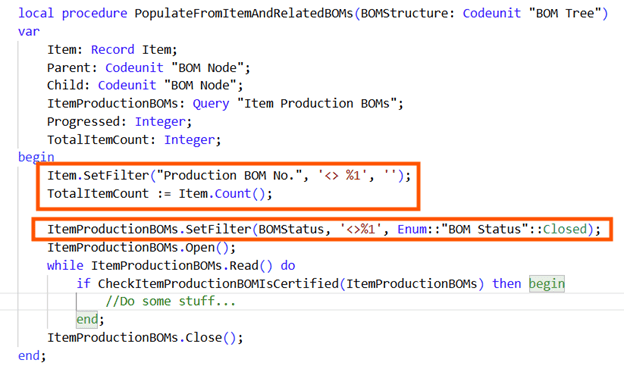
and the procedure that makes use of it is as follows:
Wait… what?…
Yes. You get that well. It filters a local Item variable to get the number of items that are bounded to a Production BOM but… it does NOT filter the AL Query to skip them from the beginning. 😊 ☹
In my practical case, there were let’s say 10000 Items that does NOT have a Production BOM No. and could have been easily skipped from the AL Query loop since the beginning, if only a filter was applied.
BUT if this filter was applied, I would have not spitted blood (guys… life ain’t easy! And this is the fun of it.) in find out the issue that is the fundament of this blog post.
Eyes on me and continue to be focused.
Based on the code above, the AL Query loops on the 10000 Items and procedure CheckItemProductionBOMIsCertified:
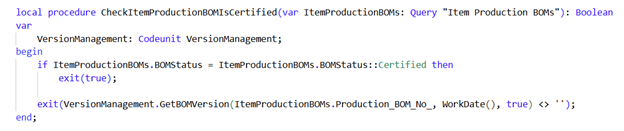
Since the 10000 Items without BOM number fall back to enum default BOMStatus::New, code is moving down in the GetMBOMVersion with values like ‘’, Workdate, true for all the damn 10K times.
Calm down, calm down… this is not the “surprise, surprise” I want to show you. This code exists since a long time.
In version 23.x (where my environment was coming from before it gets upgraded), everything in the code were exactly the same EXCEPT for one single, stupid
ProductionBOMVersion.SetLoadFields(“Version Code”);

see below:
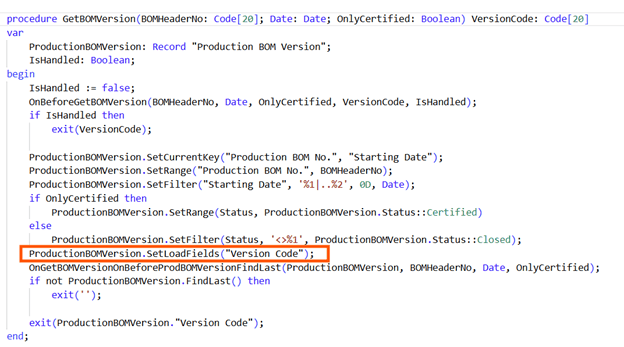
… and this changed everything.
TROUBLESHOOTING
I am honest. This migration was from 23.6 to 27.6 On-Premises hence I have used SQL Server profiler and other (free of charge) tools to spot out where the problem lies but I am more than able and willing to demonstrate the behavior also with 28.4 Online in a Cronus database and – what else – verbose Telemetry!
NOTE: all Production BOMs in Cronus database (at least, in the US localized version) have Status = Certified, hence the Items that have “Production BOM No.” populated, will skip GetBOMVersion();
Just deploy this 3S extension (3S = Super Simple Stupid) like the following:
    [EventSubscriber(ObjectType::Codeunit, Codeunit::VersionManagement, OnGetBOMVersionOnBeforeProdBOMVersionFindLast, '', false, false)]
    local procedure OnGetBOMVersionOnBeforeProdBOMVersionFindLast(var ProductionBOMVersion: Record "Production BOM Version"; BOMHeaderNo: Code[20]; Date: Date; OnlyCertified: Boolean)
    begin
        if WorkDate().Month = 8 then //Only apply in August :-)
            ProductionBOMVersion.SetLoadFields();
    end;
In this way, you just need to change workdate to someday not in August to fallback to 27.x / 28.x behavior. Choosing a date in August, it will act like in 23.x and get the whole record (in other words, it does not apply any SetLoadFields / partial record to get ProductionBOMVersion record with FindLast).

I did then 2 runs and in 2 different sessions and with verbose telemetry logging enabled.
Results… In your face!
Version 23.x (Workdate set to sunny August = No partial records applied)
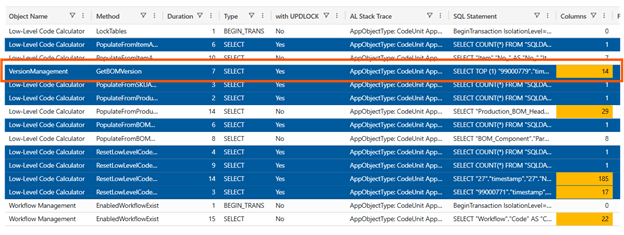
One single SELECT TOP (1) query related to ProductionBOMVersion.FindLast();. You might note that gets the whole record with 14 fields AND this will be cached in the NST.
This is quite intelligent since there is no need to repeat 10000 times the same query against SQL Server.
Caching the first query result is the life saver here. Just 1 single SQL Statement is enough.
Version 27.x (Workdate set to cold September = partial records applied)
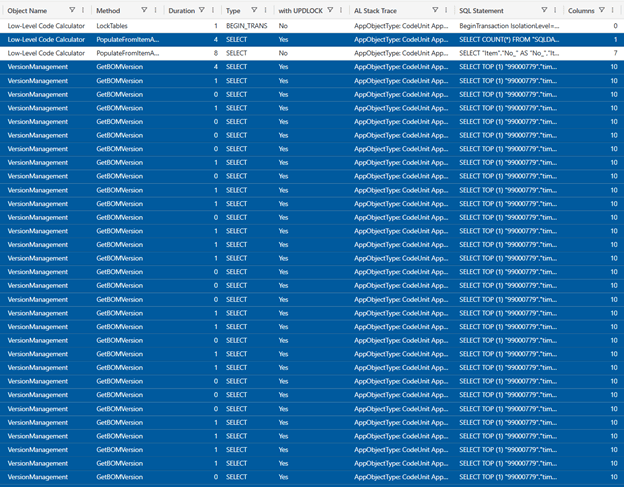

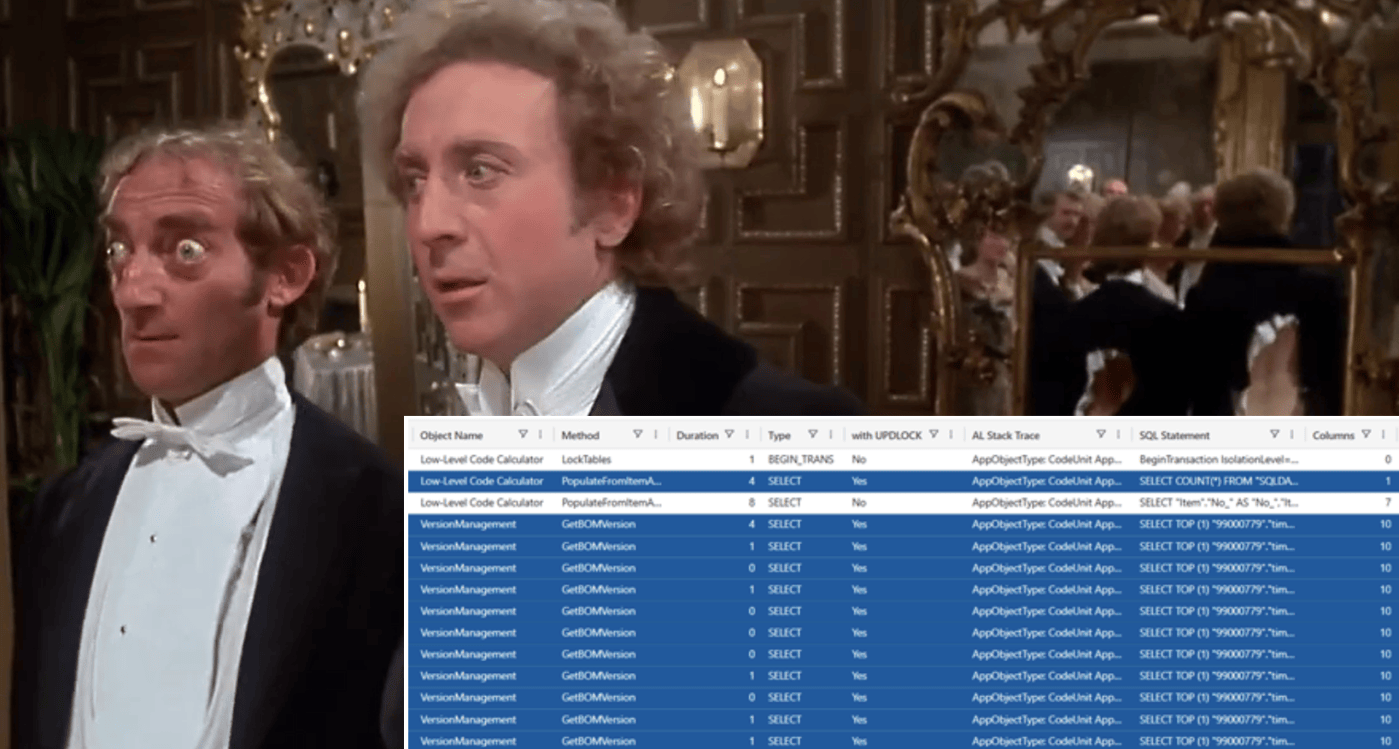
A gazillion of SELECT TOP (1) queries related to ProductionBOMVersion.FindLast();.
You might note that setloadfields do its job: it gets just 10 column out of 14 BUT it does NOT trigger NST to cache values in this scenario.
Alla fine della fiera (it’s the Italian equivalent to “In the end”) you have one very same SQL statement issued from NST for every single item that does not have Production BOM: in total more than 10000 SQL Statements.
OH BOY !!!
If you test with 20 items, the time elapsed is peanuts… But with 10000 or 100000 Items, it is a serious thing.
CONCLUSION
Dynamics 365 Business Central Product Group Application developer (or AI Agent) wisely thought that retrieving just 10 fields out of 14 in a local variable is an easy super small optimization. And I thought so too… Until it derailed to the behavior described and caused a performance regression.
And this behavior has existed since a long time.
I have tested the opposite in v23.6 (adding a setloadfields in this exact same scenario by cloning the procedure) and it behaves exactly the same as in v27/v28: it does not cache. So it is as it is: the current design.
Now do a bit of math…
In version 23.6 IT Localized there are 410 SetLoadFields in the Base Application.
In version 27.6 IT localized there are 943 SetLoadFields in the Base Application.
And in later versions there are more and more.
Is this the only isolated scenario where SetLoadFields fa il birichino? (I cannot translate this…) or you think there might be more?…
Hope that Microsoft will change this feature in the platform and implement the same caching mechanism with partial record feature, overall when Dynamics 365 Business Central 2026 Wave 2 (v29) will not have anymore any $ext table and the impact of partial records compared to previous version will be less sensible or even regressed vs full record retrivial (due to legacy caching).
WHAT BCQuality SAYS?
When NOT to use partial records, accordingly to BCQuality in relation to caching mechanisms?
Well… currently there is not so much related to this scenario but Microsoft sources from platform team declares to not over-optimize (first time I am using this term, typically I am using ABUSE) record access with partial records but use it only against record with:
- High Number of Columns. The value of partial records increase with the number and type of columns that are not retrieved compared to the whole recordset.
- Low Ratio of Columns retrieved. For example when you get less than 40% of the entire record set. But this depends also on field types (e.g. if you have huge Text columns). If you have to retrieve e.g. 99 columns vs 100 then better not to adventure on partial records.
- High Number of Records retrieved. If your query is optimized and intended to retrieve one single record: FindFirst, FindLast and Get, with the current design, it has typically lower impact, compared to retrieving large recordset like FindSet.
I know. This makes partial record a swamp and not so blindly and easily applicable to all database access.
If Microsoft will ever (I deeply HOPE so) make the SAME caching mechanism as it works with the fully blown recordset, then SetLoadFields will be a more easier (and safer) choice for both AI agents and human developers.



SetLoadFields() was never meant to be used unconditionally before every Findxxx or Get.
It can help in a few specific scenarios, but it makes more harm than good if applied everywhere.
It lost much of its value when BC changed from multiple to one companion table, and from BC29 it becomes even harder to find good use cases for it.
LikeLike
To me, the major problem is not the JIT-Loading. I could accept this one (and it would be far more easy if there will ever be a signal to capture them, but this is another story). JIT-Loading is a Yes/No development thingy. What I dislike is the unfinished caching capabilities.
This is really what makes partial record a swamp, as of now.
It is not easy, then, to proactively decide weather or not implement partial records since it will turn to be a data driven decision. Hence it turns to be a question mark every time.
I am all in with you stating that the benefit is directly proportional to the JOIN cost and with v29 it is quite reduced, hence – due to caching – it might even be more a problem than a solution. If it is / was not used with caution (caution = tested).
LikeLike
Even if MS improves the caching, it will not never cache fields it doesn’t load 🙂
So if you loop a table with SetLoadFields and per record use another field, it will have to get it per record – also if MS fixes the caching issue.
As an example, then I once counted 22 different places each Item was retrieved during purchase posting in standard BC. If each of them had a unique SetLoadFields, then it would cost a SQL roundtrip each time – multiplied with the number of document lines this could be quite a bit.
LikeLike