

The best things that happen in life are true love and… when Microsoft change the platform code (for good) without the need for you to do anything.
Just PIVOT!… and stay on the couch and enjoy being served…

Dynamics 365 Business Central 2026 Wave 1 (v28) introduces a new platform artifact (you can see it in the Microsoft System app) in the form of a Codeunit: (2000000024) System.Runtime.Base64Convert
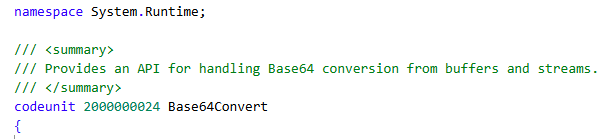
Native methods and their overloads:
procedure ToBase64(String: Text; InsertLineBreaks: Boolean; TextEncoding: TextEncoding; Codepage: Integer): Text(String: Text; InsertLineBreaks: Boolean; TextEncoding: TextEncoding; Codepage: Integer; OutStream: OutStream)(InStream: InStream; InsertLineBreaks: Boolean): Text(InStream: InStream; InsertLineBreaks: Boolean; OutStream: OutStream)procedure FromBase64(Base64String: Text; TextEncoding: TextEncoding; CodePage: Integer): Text(Base64String: Text; TextEncoding: TextEncoding; CodePage: Integer; OutStream: OutStream)(Base64String: Text; OutStream: OutStream) (InStream: InStream) : Text(InStream: InStream; OutStream: OutStream)
This is a shiny brand new system codeunit that has been streamlined to handle encoding and decoding Base64 files in a faster way and, overall, to lower the NST memory footprint.
In shorts – explained to the casalinga di Voghera (an ordinary housewife, like my wife, she is naturally born Vogherese) – this was really needed for resource governance in the online version, to minimize memory starvation episodes and avoid performance fluctuations.
Why, then, can you just sit and relax on your couch?
First and foremost: you always must sit and relax and enjoy your life…
Because there is no need for refactoring code to have this working in your application. It is just automatic.
It is just… there.
This happens because in Dynamics 365 Business Central 2026 Wave 2 (v28), all the typical encoding / decoding calls like:
var Base64Convert: Codeunit "Base64 Convert"; FileInStr: InStream; Base64OutStr: OutStream; DecodedOutStr: OutStream; Base64Text: Text; DecodedText: Text;…Base64OutStr.WriteText(Base64Convert.ToBase64(FileInStr));…DecodedOutStr.WriteText(Base64Convert.FromBase64(Base64Text));…
are all using single instance Codeunit 4110 “Base64 Convert” that is now falling back to Codeunit 4111 “Base64 Convert Impl.”, hence implementing natively the new platform Codeunit 2000000024 Base64Convert.
Within this “Codeunit matrioska”, the Implementation (Codeunit 4111) is the one that is also adding application safeguards in telemetry as warning for excessive string length dimensions (when strings are bigger than 10MB)
SourceWarningLength := 10485760; // 10 * 1024 * 1024 = 10 MB
to be more resource savvy and decide if and when refactoring your code.
AH. Have I said code refactoring? Yes, I have.
(it is fun when I am asking and answering myself in one sentence… Fun or insane? …who cares).
The new platform also implements a stream-based encoding/decoding mechanism that could also have better performance than the previous one.
If you want to opt-in for these methods, you must refactor your code and use these new methods and overload like:
var Base64Convert: Codeunit "Base64 Convert"; FileInStr: InStream; Base64OutStr: OutStream; DecodedOutStr: OutStream;…Base64Convert.ToBase64(FileInStr, false, Base64OutStr);…Base64Convert.FromBase64(Base64Text, DecodedOutStr);…
I was curious about this change under the hood and created a simple proof of concept app that you can download here:
DT.AL/MakeBase64Faster at main · duiliotacconi/DT.AL
It works super easy and you can use that also to perform your own test before / after upgrading online or migrating (for on premises) from one version to another.
You just simply must comment on these 2 lines in codeunit 50101 “Base64 File Mgt.” :
…Base64Convert.FromBase64(Base64Text, DecodedOutStr); //To Be commented in 27.x or earlier…Base64Convert.ToBase64(FileInStr, false, Base64OutStr); //To Be commented in 27.x or earlier…
if you want to test results with any version prior 28.x (to be honest, Microsoft also implemented these changes in version 27.5 online – I haven’t tested on-premises -).

TESTING STEPS
- ZIP a folder that contains N files of whatever type (I have used PDF, PPTX, Images…). NOTE: the total zipped file should not exceed 350 MB, to be imported and handled online.
- Deploy the proof-of-concept extension
- Search for “Base64 Files” page in the Web Client
- Click “Setup” and choose how you want to encode and decode files
- Click “Upload zip and encode” action. It will unzip and encode the files one by one and return the total time elapsed for the whole upload operation in a message and store the total encode time (ms), the number of files and average encode time (ms).
- Click “Decode and export zip” action. It will decode all the files one by one and return a zipped file and the total time elapsed for the whole action (download excluded). It will also store the total decode time (ms), and average decode time (ms).
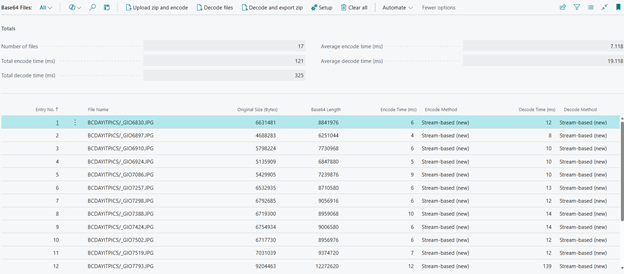
- If you want to start from scratch, click “Clear All”.
If you have no time to test, I did it myself with very different bunch of files using the following configuration:
Dynamics 365 Business Central Online IT 27.0
Dynamics 365 Business Central Online IT 28.3
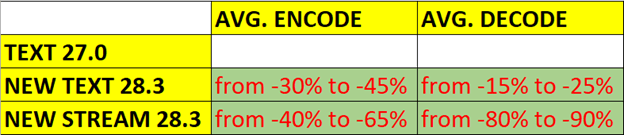
These are my results:
CONCLUSIONS
Bold move by Product Group in speeding up Base64 handling and making it more (memory) resource savvy. I would say, two birds with a stone.
What action must be done by partner / customers? Absolutely nothing. And you gain from 30% to 45% better performance in encoding and from 15% to 25% in decoding.
All the above, just staying on the couch and relaxing.

And if you have a tremendous need to optimize THAT specific process(es) that heavily involve(s) Base64 handling, give it a try with Dynamics 365 Business Central 2026 Wave 1 (v28) and the new methods introduced to speed up encoding / decoding.
The stream-based methods should also be added to your new development and/or AI-assisted development best practices.


Leave a Reply