
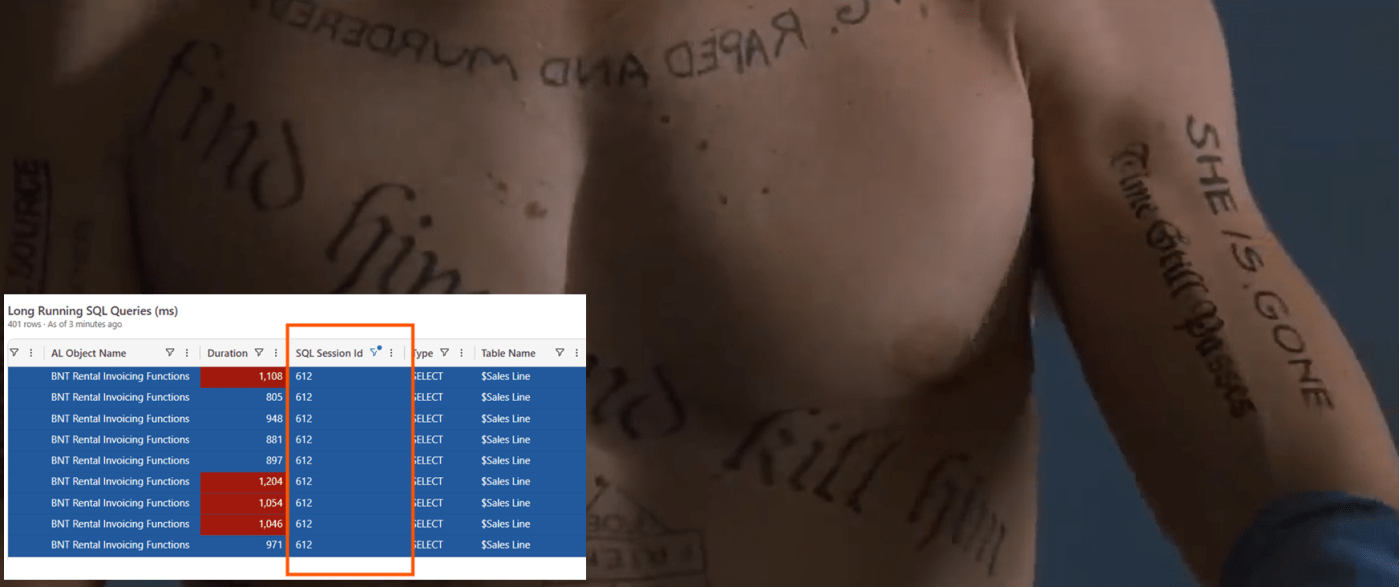
Dynamics 365 Business Central 2026 Wave 1 (v28) Telemetry adds sqlServerSessionId in Long Running Queries (LRQ) signal RT0005. In practical terms, all the standard signals that are emitting a sqlStatement now also have the relatedsql server session id).
Why sqlServerSessionId added in all traces that have sqlStatement != “” is important?
Because, in Lock Timeout scenarios, it helps you identify blocking AL Session.
Mmmm… Don’t we have already Lock Snapshot signal RT0013?
Ah. You did your homework.
Yes, that is true. We have Lock Snapshot signals that issue a query from NST to SQL to gather all locks for that specific table that was the cause of the Lock Timeout.
With Dynamics 365 Business Central Online and, more generally, in environments with multiple NSTs pointing to the same database (legacy or multitenant, it does not matter), it happens frequently that AL session X that was causing lock timeout in AL Session Y are running in different NSTs.
Hence, Lock Snapshot signal cannot gather the AL Session Id and AL Stack Trace of the offending session and you are left only with the sqlServerSessionId. A sort of stack trace… amnesia.

Let me show you a practical example of the investigation flow.
- Determine Lock Timeout

There have been 2 Lock Timeout (RT0012), close to each other, at 3:17 PM UTC+2 and the 2 victims were sqlServerSessionId 339 and 798
- Look for Lock Snapshots

Filtering Lock Snapshot signal (RT0013) clearly shows up that sqlServerSessionId that is holding the lock is 612 BUT there is no AL Stack Trace that might help you correlate what was the blocking session.
This is a signal that the blocking query was running on a separate NST.
What to do in this case? (See next point, champ!)
- Look for Lock Snapshot sqlServerSessionId(s) in Long Running SQL Queries (LRQ) signal RT0005.

Filtering LRQ using sqlServerSessionId 612 in a closer time window where the Lock Timeout happened, pointed out to
- Session Id 9bd05841-042a-43a5-b011-29e98000711b
- Repeated LRQ in UPDLOCK on Sales Line like:
SELECT "37"."timestamp", "37"."Document Type", "37"."Document No_", "37"."Line No_", "37".< < < - TRUNCATED ->> >FROM "SQLDATABASE".dbo."CURRENTCOMPANY$Sales Line$437dbf0e-84ff-417a-965d-ed2bb9650972" "37" WITH(UPDLOCK) JOIN "SQLDATABASE".dbo."CURRENTCOMPANY$Sales Line$437dbf0e-84ff-417a-965d-ed2bb9650972$ext" "37_ext" WITH(UPDLOCK) ON ("37"."Document Type" = "37_ext"."Document Type") AND ("37"."Document No_" = "37_ext"."Document No_") AND ("37"."Line No_" = "37_ext"."Line No_")WHERE ( "37"."Document Type" = @0 AND "37"."Sell-to Customer No_" = @1 AND "37"."Amount Including VAT" <> @2 AND "37_ext"."BNT Rental Line$2cfcbca6-bd28-4140-b8a8-0a36012a8aed" = @3 AND "37_ext"."BNT Deposit Line$2cfcbca6-bd28-4140-b8a8-0a36012a8aed" = @4 )ORDER BY "Document Type" ASC, "Document No_" ASC, "Line No_" ASC OPTION(OPTIMIZE FOR UNKNOWN, FAST 50)
- Analyse session_id from Long Running SQL Queries (LRQ) signal RT0005.
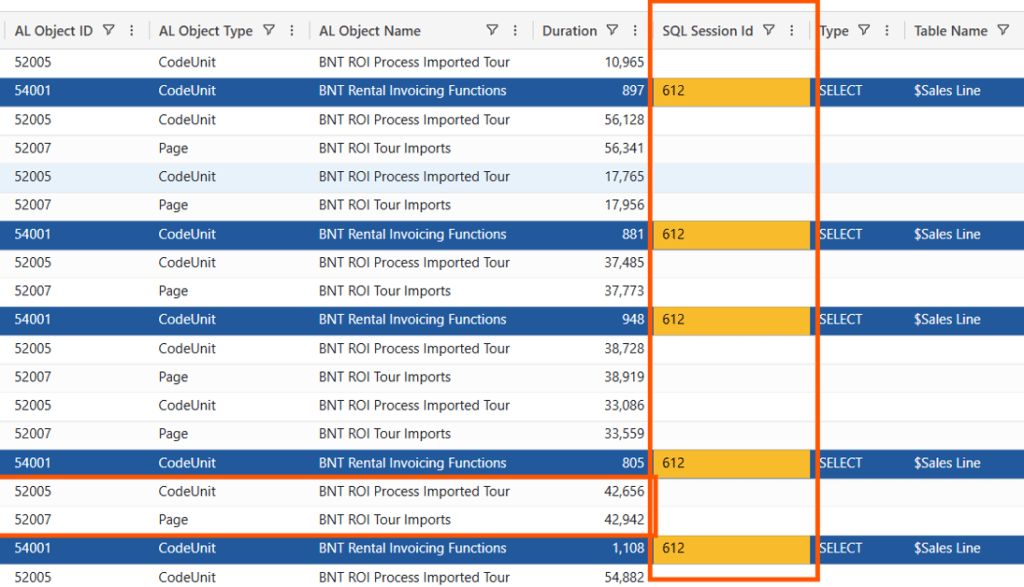
Session Details provides “everything” about a specific session that is logged in telemetry (a union of both traces and pageViews).

Since a Lock Timeout raises after 30 seconds in Dynamics 365 Business Central Online, it is feasible that custom Codeunit 54001 (BNT Rental Invoicing Functions) GetTotalOrderCustomerBill is the offending method.
Guess what the method was doing (inside a write transaction)?…
local procedure GetTotalOrderCustomerBill(CustNo: Code[20]): Decimal var SalesHeader: Record "Sales Header"; SalesLine: Record "Sales Line"; TotalAmount: Decimal; begin TotalAmount := 0; SalesLine.SetRange("Sell-to Customer No.", CustNo); SalesLine.SetRange("Document Type", SalesLine."Document Type"::Order); SalesLine.SetFilter("Amount Including VAT", '<>%1', 0); SalesLine.SetRange("BNT Rental Line", false); SalesLine.SetRange("BNT Deposit Line", false); if SalesLine.FindSet() then repeat SalesHeader.Get(SalesHeader."Document Type"::Order, SalesLine."Document No."); if SalesHeader.Status = SalesHeader.Status::Released then TotalAmount += SalesLine."Amount Including VAT"; until SalesLine.Next() = 0; exit(TotalAmount); end;
You want to know about (one of) the solution? Easy.

If you just want the one-line concurrency fix, simply add SalesLine.ReadIsolation(IsolationLevel::ReadUncommitted); before the SalesLine.FindSet(). That is enough to let the query run with no harm to others.
But I know that you, and everyone else, would have taken the chance to optimize that piece of sh..code, writing down an AL Query that return one record with the needed SUM, and join both Sales Header and Sales Line (in ReadUncommitted – obviously -)
query 54010 "BNT Cust. Order Bill"{ QueryType = Normal; ReadIsolation = ReadUncommitted; elements { dataitem(SalesHeader; "Sales Header") { DataItemTableFilter = "Document Type" = const(Order), Status = const(Released); filter(SellToCustomerNo; "Sell-to Customer No.") { } dataitem(SalesLine; "Sales Line") { DataItemLink = "Document Type" = SalesHeader."Document Type", "Document No." = SalesHeader."No."; SqlJoinType = InnerJoin; filter(BNTRentalLine; "BNT Rental Line") { } filter(BNTDepositLine; "BNT Deposit Line") { } column(TotalAmountInclVAT; "Amount Including VAT") { Method = Sum; } } } }}
And slightly change the code to get that record from the AL Query:
local procedure GetTotalOrderCustomerBill(CustNo: Code[20]): Decimalvar CustOrderBill: Query "BNT Cust. Order Bill";begin CustOrderBill.SetRange(SellToCustomerNo, CustNo); CustOrderBill.SetRange(BNTRentalLine, false); CustOrderBill.SetRange(BNTDepositLine, false); CustOrderBill.Open(); if CustOrderBill.Read() then exit(CustOrderBill.TotalAmountInclVAT) else exit(0);end;

AND ALL OF THIS WITH JUST sqlServerSessionId in Long Running SQL Queries
CONCLUSION
(AND BC TELEMETRY BUDDY PROMPT)
I did all of the above using my own hands (and brain – or whatever is nested into the top of my head -).

If you are using the almighty BC Telemetry Buddy, just attach a screenshot of the Lock Timeouts from your KQL Dashaboard (or ask BCTB to get them from telemetry) and add the following prompt:
“Use BC Telemetry buddy to determine what is the AL method that CAUSED the [attached] lock timeouts. This workspace contains the per tenant extension source code.
If you do not have any useful (or at all) stack trace in Lock Snapshot signal (RT0013), then sqlServerSessionId might be your lamp in the dark to find out the offending blocking session. Try to follow these rules:
- Isolate Lock Timeout (RT0012) and Lock Timeout Snapshot Id
- With Snapshot Id, Isolate Lock Snapshot (RT0013) records and their sqlServerSessionId
- Filter Long Running SQL Queries (RT0005) with the sqlServerSessionId and look at the other signals provided in the session (filtering by session_id) “
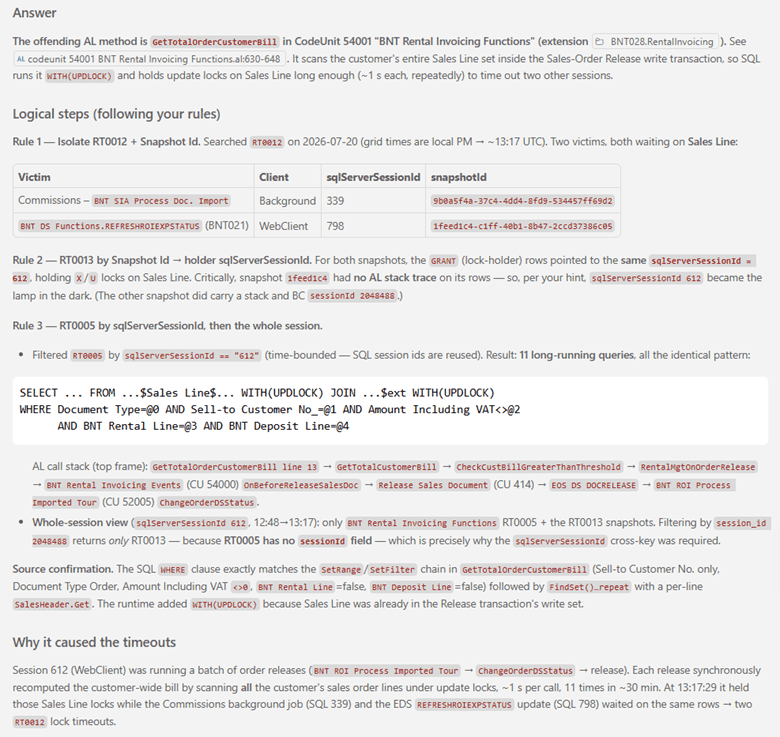
And this is my own result (Claude Opus 4.8 – I know, I know… I am a rich bit..$$$):
FOOTNOTE
Since Dynamics NAV 2013 (version 7.0) – more than 12 years ago -, the platform adopted the usage of MARS (Multiple Active Record Sets) and Connection Pooling.
Without going into too much posh detail, note that sqlServerSessionId is not the current, specific MARS request_Id, nor an Id for a unique SQL Server Session, due to connection pooling. As a result, you may find the same sqlServerSessionId associated with different session_id values in your KQL queries and in different times.
But if you isolate the one (or rarely few ones) that are close to the Lock Timeout time window, you should be able to point out your light to the appropriate blocking session.



Leave a Reply