
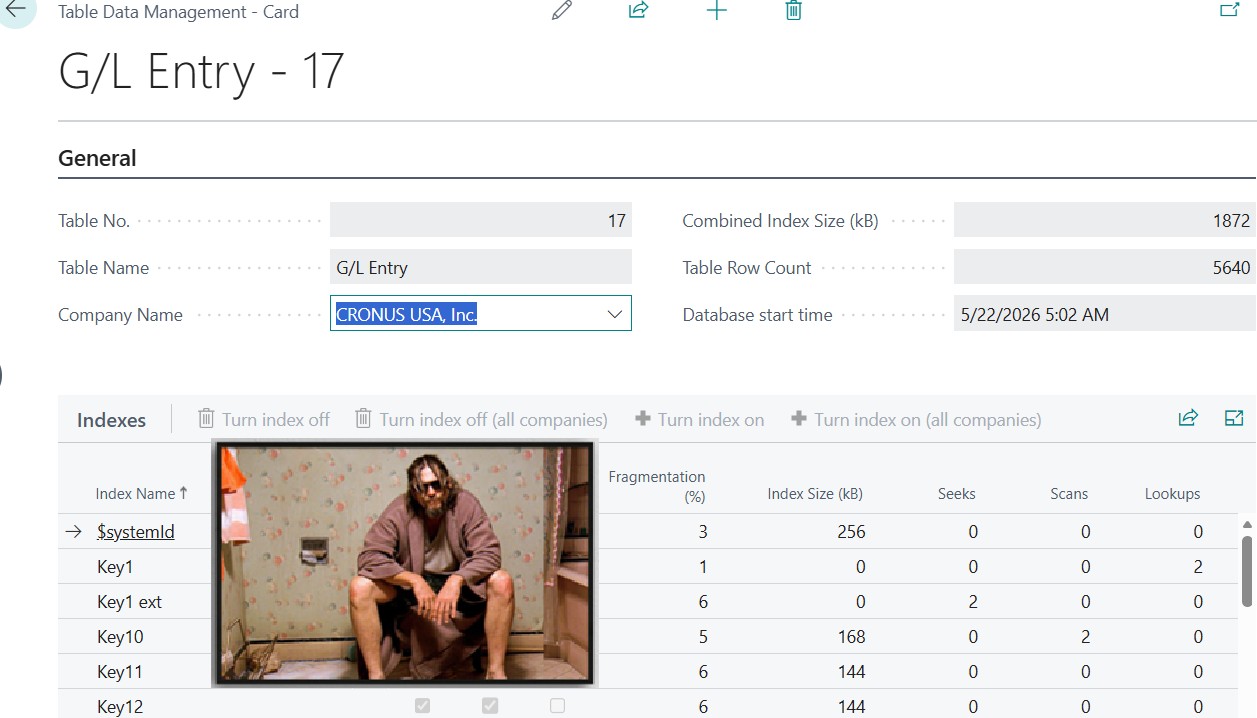
This is the greatest performance improvement included in Dynamics 365 Business Central 2026 Wave 1 (version 28): capability of disabling / enabling indexes at will.
Considering the online version,
it is HUGE !
On-premises… meh (it has always been possible to create or drop indexes in SQL at will).
Why it is huge? Because you are now able to reduce the duration of SQL Writes (INSERT, UPDATE, DELETE) by removing bad and unused indexes.
My typical evergreen example:
Sales Line: key12 “Job Contract Entry No.”
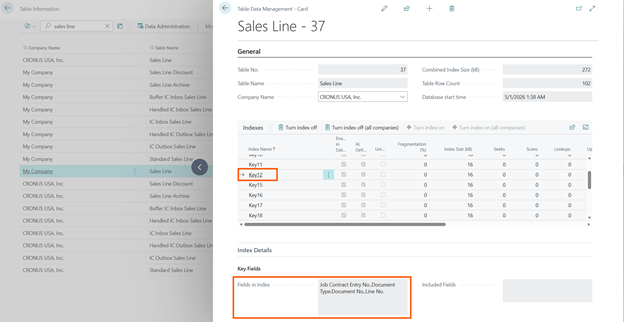
If you are not using Job/Project Module at all in your environment, then you will end up having an index with all blanks + primary key (Document Type, Document No., Line No.) that is totally useless. And this will be repeated in all your companies that you are copying and in all the environment that are copies of the production.
And now I say: if it is useless, flush it in the toilet with no regrets and click on “Turn index off (all companies)“

Bye Bye Baby!!!
The advantages are:
- Better Writes.
One less index to be maintained at every Insert and Delete (and Update, if one or more key columns are changing).
- Less space.
(Index key fields + (remaining) Primary Key fields) * No. of Records
is the space released when turning off the index.
It is not over. If you find out Indexes that are not declared as AL “unique” and not AL defined, it means that Microsoft added these automatically – sometimes in the past – based on workload analysis.
It should not be new to you, right? Microsoft declared it was working on auto-tuning indexes since 2019 (see this BC TechDays video, back then – go to 1:02:30)
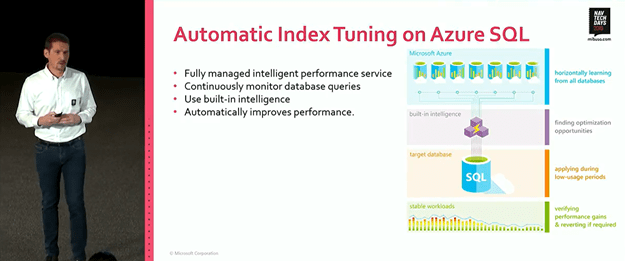
You might see that this kind of automation will check and verify if there are performance gains with the applied index and revert it if it is not satisfactory.
But it cannot continue to check for a lifetime. It will check only for a specific query and small period if the index is reasonably ok to be used, otherwise it will be dropped. Past this period, it will stay. Forever.
R-e-a-d my lips.
You might find out in your production databases, indexes that you have never added.
These indexes might be heavily used (high number in Seeks and/or Scans and/or Lookups) or just a relic of the past (low or zero values in Seeks, Scans and Lookups).
And last, you can easily decide to flush them into the toilet, if they are a relic of the past

(busy toilet, today 😉).
THE QUEEN (the query) BEHIND THE SCENES
How values are populated in the page, depends on the underlying query:
SELECT i.index_id, i.name AS [Index Name], STRING_AGG(CASE WHEN ic.is_included_column = 0 THEN c.name END, ',') WITHIN GROUP (ORDER BY ic.key_ordinal) AS [Columns], STRING_AGG(CASE WHEN ic.is_included_column = 1 THEN c.name END, ',') AS [Included Columns], istats.user_seeks [User Seeks], istats.user_scans [User Scans], istats.user_lookups [User Lookups], istats.user_updates [User Updates], istats.last_user_seek [Last User Seek], istats.last_user_scan [Last User Scan], istats.last_user_lookup [Last User Lookup], istats.last_user_update [Last User Update], i.is_disabled, p.size_kb AS [Index Size (KB)], p.row_count AS [Row Count], OBJECT_NAME(i.object_id) AS [Table Name], p.frag AS [Fragmentation], STATS_DATE(i.object_id, i.index_id) AS [Last Statistics Update]FROM sys.indexes iLEFT JOIN( SELECT part.object_id, part.index_id, SUM(part.used_page_count) * 8 AS size_kb, SUM(part.row_count) AS row_count, AVG(ips.avg_fragmentation_in_percent) AS frag FROM sys.dm_db_partition_stats part OUTER APPLY sys.dm_db_index_physical_stats(DB_ID(), OBJECT_ID(@0), part.index_id, NULL, 'LIMITED') ips GROUP BY part.object_id, part.index_id) p ON p.object_id = i.object_id AND p.index_id = i.index_idJOIN sys.dm_db_partition_stats part ON i.object_id = part.object_id AND i.index_id = part.index_idLEFT JOIN sys.dm_db_index_usage_stats istats ON istats.index_id = i.index_id AND istats.object_id = i.object_id AND istats.database_id = DB_ID()LEFT JOIN sys.index_columns ic ON ic.object_id = i.object_id AND ic.index_id = i.index_idLEFT JOIN sys.columns c ON c.object_id = ic.object_id AND c.column_id = ic.column_idWHERE (i.object_id = OBJECT_ID(@0)) AND i.name = @1GROUP BY i.object_id, i.index_id, i.name, i.is_disabled, istats.user_seeks, istats.user_scans, istats.user_lookups, istats.user_updates, istats.last_user_seek, istats.last_user_scan, istats.last_user_lookup, istats.last_user_update, p.row_count, p.frag, p.size_kbORDER BY i.object_id, i.index_id
HEADER VALUES
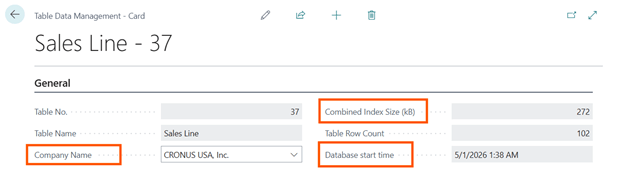
Company Name
Since the dawn of time, AL Table that has the property TablePerCompany = Yes are separated in N SQL Server Table with N = Number of Companies. Therefore, it makes all sense to specify values such as e.g. Combined Index Size for a specific table in a specific company.
Combined Index Size (kB)
This is just the sum of every single Index contribution that you find out in the Index Details list part. Every index has its “weight” on the total data size. Adding an Index will increase such weight, while removing an index will reduce it. Remember that an index is composed of Index Fields + Primary Key fields (to be able to perform a lookup on the record data).
Database start time
IMPORTANT. Check carefully the value of this field before making any changes. This value determines since when values that are popping up in this page have been calculated: every time the database restart, so it does the SQL Dynamic Management Views – DMVs – associated with the queen (the query) that populates this page.
The optimal would be, at least, 30 days (a typical ERP working cycle). But it is totally up to you to determine when it is the best time.
You can keep the database start time monitored in telemetry by looking at wait statistics. These are also reporting the last database restart as well.
traces| where customDimensions.eventId == "RT0026"| project timestamp , lastRestart = format_datetime(datetime_add('millisecond', - toint(customDimensions.databaseStartedDuration), timestamp),'yyyy-MM-dd')| distinct lastRestart| where lastRestart != ""| sort by lastRestart desc
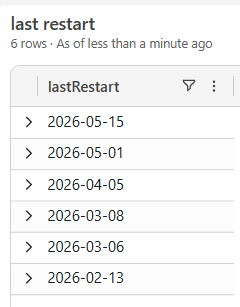
BE CAREFUL. Microsoft is restarting database quite often. So… seize the day 😉

LINE VALUES
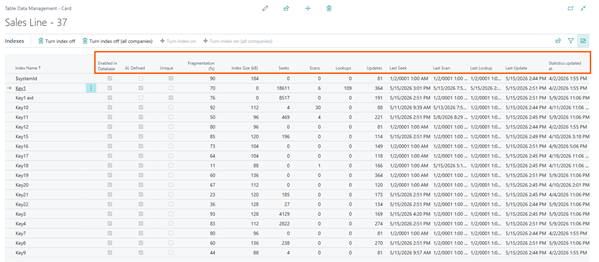
Enabled in Database
Index defined in metadata but not Enabled in the database. In shorts: no index in the database for reading and, on the other hand, no index to maintain during writes.
AL Defined
Extended table PK (if any) and immutable key (systemId) are not explicitly defined somewhere in AL but they are automatically created. They will/should never be removed.
There is another key that you might find out as not explicitly defined in AL: the ones that you are adding manually on-premises and the ones that are added automatically by DAMS in the online version.
Unique
Could have been named differently. Immutable keys and extended table PK, are marked as unique. Do not know why base table PK has not been marked as Unique. Don’t ask.
Fragmentation (%)
Data are written randomly hence indexes might easily be sparse and their performance in reading might decrease over time if they are not reorganized or rebuilt to be contiguous. This is part of the traditional database maintenance. This task should be upon Microsoft but finding out the best index rebuild strategy, considering a wide variety of data pools (as of today 55K+ and counting live customers!), is all but easy.
As rule of thumb, you might take into considerations tables with
- 1.000+ records
- Fragmentation > 30%
This is not written in the stone, if you have e.g. 10.000.000 records probably is better to consider a rebuild when fragmentation is > 10%. Even tough this could be simplicistic and debatable. If you have good arguments to change these values on this blog post, you are more then welcome to poke me here, or on LinkedIn or anywhere else (and if you are polite, MAYBE I might respond you… c’mon, of course I will!).
To cut the crap: decide what’s best for you, knowing that the lower fragmentation is, the faster is the index data retrieval.
The sequence trick here is to:
- Disable the index.
This should be matter of seconds since it will just phase out the index in a blink of an eye.
- Enable the index.
You will take 2 birds with a stone: reduce fragmentation and update statistics (since they will be updated with Full Scan = columns statistics are updated as well).
The best suggestion that I could give you is to perform this task on Friday – if you are not a 24/7-, since rebuild action will take place during the typical non-working hours of the “localization time” – I observe 00:00 in Italy (CEST), but it might be different – (for more info on service updates, see How to choose the best Update Window in Dynamics 365 Business Central Online – Dynamics 365 Business Central tales, myths, legends. And something serious.), hence you will not keep the environment without a potentially needed index for a long time.

Index Size (kB)
This is the re-gain in capacity, for a specific company, if you drop the index. Or its weight/debt in capacity, if you keep it.
Seeks / Scans / Lookups
Let’s focus on the basics and not get into the deep interpretation of each single values vs SQL Execution Plans. I’ll be pragmatic: the sum of these values could be considered as the number of times an index has been used to READ data.
Updates
The number of times an index has been updated (WRITE index data).
Bad Index = Zero Read and High Updates
Bad Indexes should be disabled.
Bye-Bye Index – another flush in the toilet –.

Last Seek / Scan / Lookup / Update
This is interesting to understand when an index was used last time by the application.
Unused (outdated) Index = Last Read (index seek, scan or lookup) far back in time
It is VERY important to check the database start time in the index detail header, to understand since when such data are collected. You might adventure in defining an index unused, at least after a business cycle (e.g. 1 Month).
Unused (outdated) Indexes should join the flush-in-the-toilet club as well.
Statistics updated at
SQL Server lives with statistics and estimations. The Query Optimizer is the biggest gambler in the world. The more statistics on data distribution are up to date, the better (hence faster) the execution plans are.
I love the way Brent Ozar introduces them by playing cards: An Introduction to Microsoft SQL Server’s Statistics
Providing a rule of thumb for the best value on last statistics update date is quite hard since it depends on how much data are in the table, how many changes have been made on the data pool (INSERT, UPDATE, DELETE) and in relation to UPDATEs, which fields have been updated.
Just consider this date as the more recent it is, the better confidence you might give in SQL to create a valid execution plan because statistics are up to date.
CONCLUSION
Dynamics 365 Business Central 2026 Wave 1 close the circle in relation of Index Tuning providing a way to disable / enable indexes at will and with a discrete number of statistics to take an informed decision on what to keep or… flush in the toilet.
My recipe is:

- Check Number of records in Table Information. If these are < 1.000, come back later (unless this is a table that you inflate / deflate of records quite often).
- Check Database Start Time. The longer, the better. If it is less than 2 weeks, come back later.
- Check Reads (Seek, Scan, Lookup). The higher, the better. If you have all zeros then down in the toilet.
- Check Writes (Update). The lower, the better. If the value is super-high and there are very rare reads then it might be a potential candidate for the toilet.
- Check Last Read Dates. If these are very far back in time then (guess what?…) down in the toilet.
- Check Fragmentation. As rule of thumb if this has a high value then disable the index, go take a coffee, enable the index back. Remember that in the online version is not rebuild immediately but rebuild will happen during night hours (be careful if you have Job Queues running and the table where this index has to be rebuilt is involved in the scheduled task session since this might fail or Job Queue processing work in an unpaired manner).
- Review the results. And if you have benefits from this plan, remember to offer me a beer (or simply give me a hug and say Grazie!)…

