

Locking mechanisms are quite complex and so long to be deeply explained that could be used as a bulletproof lullaby if you need to let kids fall asleep. Or if you want to give up on someone at a speed date.
Ok. That is the max level of humor admitted when talking about locking and transactions. What will follow is serious, be prepared. And now: poker face.
ISOLATION LEVELs
Azure SQL and SQL Server official documentation explains synthetically what you need to know about transaction isolation level:
SET TRANSACTION ISOLATION LEVEL (Transact-SQL) – SQL Server | Microsoft Learn
Let’s park the snapshot isolation level, for the moment, so that we could order the isolation levels from the less locking to the more aggressive like below:
- READ UNCOMMITTED
- READ COMMITTED
- REPEATABLE READ
- SERIALIZABLE
A BIT OF HISTORY
Since its port to SQL Server from native database, Navision used to implement a pessimistic locking, enforced by the application, with SERIALIZABLE isolation level for all transactions that were accessing the same resource after a MODIFY, INSERT or DELETE (for simplicity, let’s call it object resource concurrency).
With a specific platform hotfix for Dynamics NAV 5.0 SP1 and Dynamics NAV 2009 SP1, Microsoft slightly open to less locking scenarios where it was possible to opt for REPEATABLE READ isolation level instead. And this became the transaction isolation level up to now.
After more than 11 years and 18 major releases, with Dynamics 365 Business Central 2023 Wave 2 (version 23.x), Microsoft is finally opening to enable READ COMMITTED as main transaction isolation level for object resource concurrency. This has also been called and mostly known as tri-state locking and its internals are written by the almighty Mads Gram in Tri-state locking – BC Internals
ENABLE TRI-STATE LOCKING: SAAS VERSION
Tri-state locking is in feature preview with Dynamics 365 Business Central 2023 Wave 2 (version 23.x) and it is reversible (it could be turned on and off at will). In newly created environments with 23.0 and onwards, this feature is turned ON by default while environment upgraded from previous versions it is turned OFF by default.
To enable tri-state locking in SaaS:
- From the Web Client go to “Feature Management” page
- In the last line where description shows “Feature: Enable Tri-State locking in AL” choose “Enabled for”: “All Users”.

- Log off and log on again.
IS THAT ENOUGH?
Yes. And no.
Yes, it is enough for you to enable read isolation to READ COMMITTED – and I deeply recommend it -.
No, this is not enough. Enabling READ COMMITTED in Azure SQL Database (used in SaaS) intrinsically implements
READ COMMITTED SNAPSHOT mechanism: the real power and game changer with tri-state locking.
This is reported in the official documentation:
“If READ_COMMITTED_SNAPSHOT is set to ON (the default on Azure SQL Database), the Database Engine uses row versioning to present each statement with a transactionally consistent snapshot of the data as it existed at the start of the statement. Locks are not used to protect the data from updates by other transactions.”
I think this does not shock you that much, right? Please allow me to show you in practice what exactly means the READ COMMITTED SNAPSHOT enablement. I have prepared a small sample here: DT.AL/TriStateTest at main · duiliotacconi/DT.AL (github.com)
SCENARIO
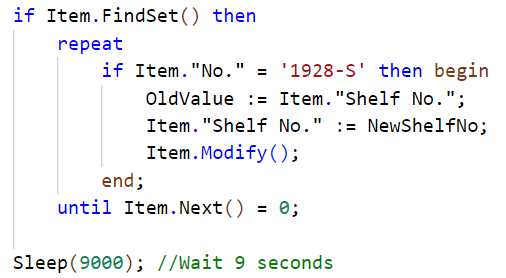
USER 1 (session X): modify Shelf No. for an Item in a loop (to make it wait for a decent time, I have added extra 9 seconds in this transaction). This will obviously lock resources for 9+ seconds.
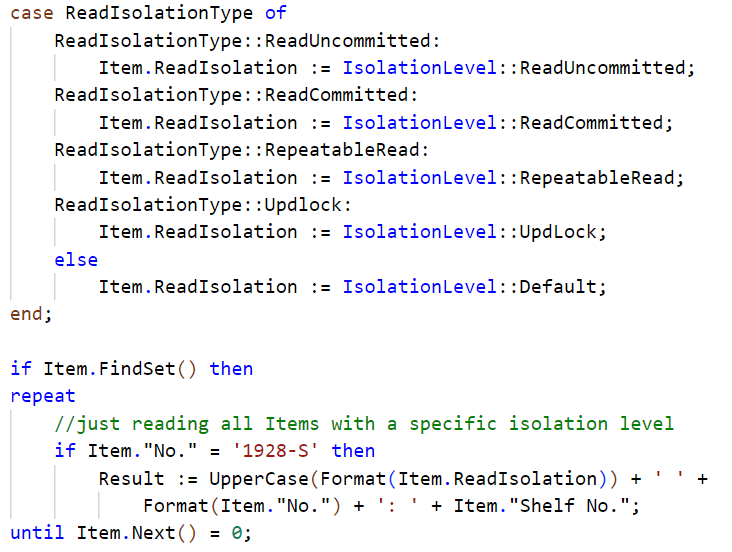
USER 2 (session Y): loop all items with a chosen isolation level.
SCENARIO with REPEATABLE READ
Let’s see it on action with REPEATABLE READ with the 2 browser sessions side by side.
Click on “RESET Shelf No.” and start with the test. Then click “UPDATE Shelf No.” in the session on the left (id 4354) and then “READ loop” in the session on the right (id 4343)
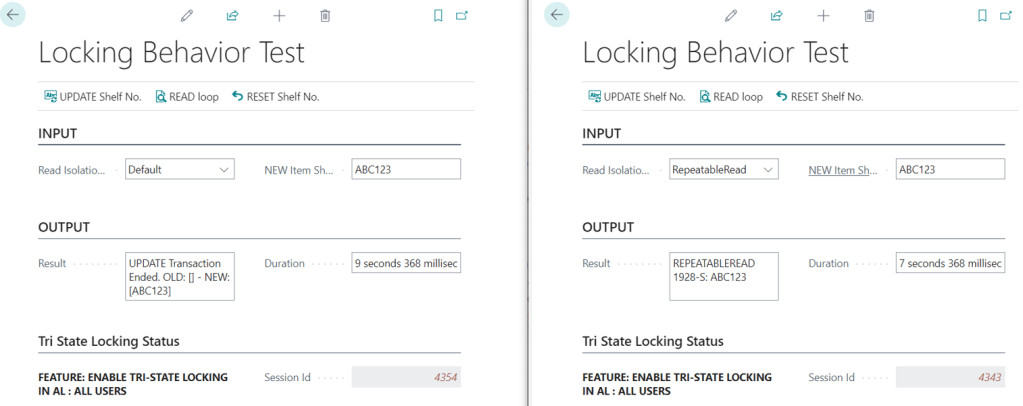
REPEATABLE READ session will wait until the UPDATE transaction release resources and read the new value. You could experience the typical spinning wheel for few seconds and the result will be reading the new value. In the case above, we probably started 2 seconds after UPDATE started hence read duration took 7 seconds approx.
This is the typical scenario since a decade. Good. Click on “RESET Shelf No.” and start with the next test.
SCENARIO with READ COMMITTED (with READ COMMITTED SNAPSHOT ON)
Let’s see it on action with READ COMMITTED.
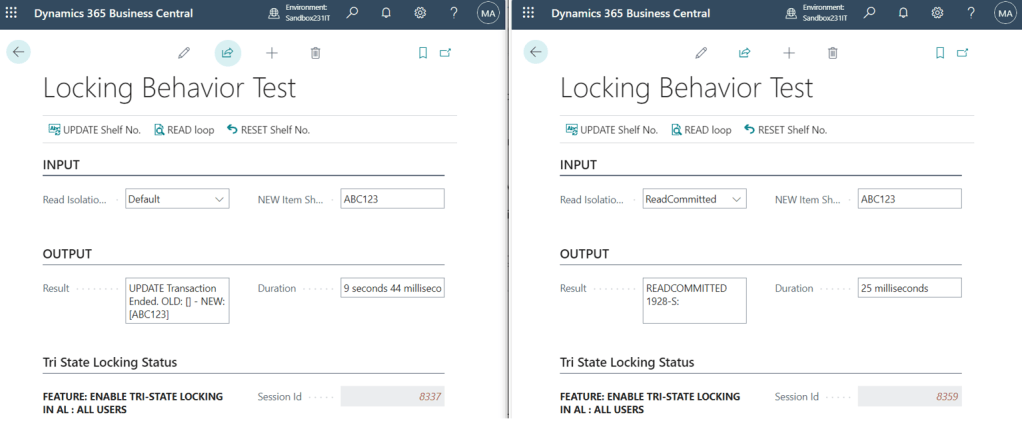
The bomb is dropped.
READ COMMITTED session with READ COMMITTED SNAPSHOT ON will read the current (committed and old) value from the snapshot and do not wait until the UPDATE transaction release resources. No spinning wheel on the read session, like there is no concurrency at all.
PAUSE FOR A SECOND: I know that now you are now thinking about all scenarios where your code could fail if you are reading an old value when a transaction is on. When you are ready, take a deep breath and CONTINUE.
ENABLE TRI-STATE LOCKING: ON-PREMISEs
To be honest, I would have skipped this section, but a Wise man said: “on-premises is still a thing”. And CI/CD and BCPT should respect the same criteria to adhere as much as possible to potential SaaS production scenarios.
To enable the tri-state locking on-premises, there are 3 important steps:
- Set to true the following key in CustomSettings.config file server side (and restart the service).

- Enable Tri-state locking from Feature Management page (same as SaaS)
Now stop it for a second.
These 2 options are enough to let the application enforce the use of READ COMMITTED instead of REPEATABLE READ. If you run a SQL Server profiler trace before and after enabling tri-state locking, you should be able to see the same queries changing the isolation level.
What about READ COMMITTED SNAPSHOT with on-premises, then? It is turned off by default and this is duly written in the documentation:
“If READ_COMMITTED_SNAPSHOT is set to OFF (the default on SQL Server), the Database Engine uses shared locks to prevent other transactions from modifying rows while the current transaction is running a read operation. The shared locks also block the statement from reading rows modified by other transactions until the other transaction is completed. The shared lock type determines when it will be released. Row locks are released before the next row is processed. Page locks are released when the next page is read, and table locks are released when the statement finishes.”
Let’s see it on action on-premises.
SCENARIO with READ COMMITTED (with READ COMMITTED SNAPSHOT OFF)
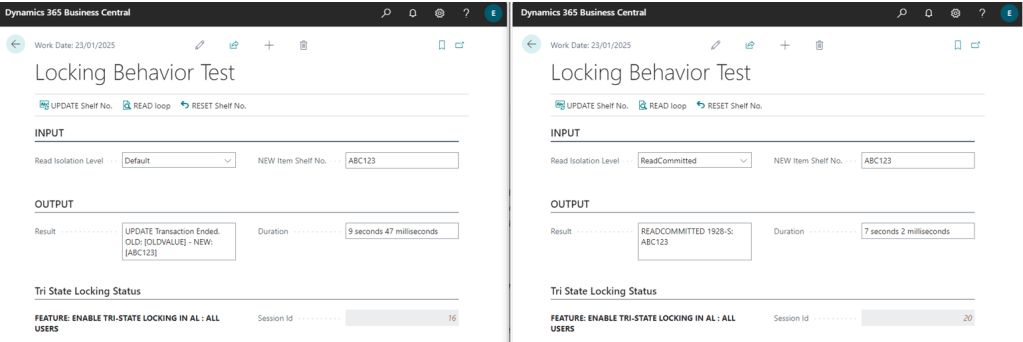
READ COMMITTED session with READ COMMITTED SNAPSHOT OFF will be blocked and wait until the UPDATE transaction release resources, like what was happening in a previous example with REPEATABLE READ.
So, now, let’s perform the third step to unleash the real power of tri-state locking also on-premises:
- Go to Database > Options > Is Read Committed Snapshot On. Change the value to True. Alternatively, execute the following query:


Then re-do the same exercise, after logging off and logging on again and enter in the realm of snapshot and row versioning, boosting concurrency to a level that nobody has ever seen before in any previous releases of Dynamics 365 Business Central (or Dyanmics NAV or Microsoft Business Solution Navision…).
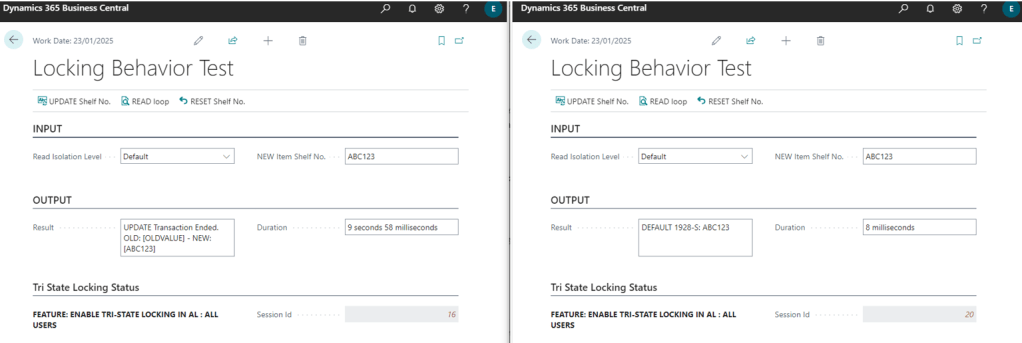
So far so good. And with this third and super important step, now also on-premises SQL database will work like Azure SQL databases and on-premises behavior matches SaaS behavior.
CONCLUSION AND FAQ
The big deal with READ COMMITTED is the enablement of READ COMMITTED SNAPSHOT to impressively improve locking behavior. This truly represents a big milestone change after a decade of REPEATABLE READs.
Would you recommend enabling tri-state locking, being in preview? As reported by Microsoft, this will be the standard de-facto read isolation behavior for Dynamics 365 Business Central in less than 1 year from now (Dynamics 365 Business Central 2024 Wave 2, version 25.x) and we are already enabling it for all new implementations or upgrades, independently by deployment type (SaaS or On-Premises).
Is there really a parity between SQL SaaS and On-Premises then? Nope. SaaS or, better, Azure SQL is offering more than this, also implementing Optimized locking – SQL Server | Microsoft Learn. I haven’t been through deeply into this, honestly, but I believe it could be only beneficial in reducing locking.
Is there any performance downside in enabling READ COMMITTED SNAPSHOT? In SaaS there is nothing to care about since everything is under Microsoft control, within on-premises you might find a ton of official and unofficial articles about the technical downsides related to this database feature. I could roughly summarize them in two points:
- Major overhead in tempdb. It is crucial the tempdb setup and tuning since row versioning is maintained there. Make it bigger to ensure space is allocated to avoid auto-grow at runtime. Use multiple tempdb data files to avoid allocation page contention and be sure it has the appropriate I/O performances.
- Storage increases 14 bytes per record. As soon as you are turning on READ COMMITTED SNAPSHOT, your current record version points to an older record version stored in tempdb. These 14 extra bytes are used for the pointer to tempdb stored row version. Due to these dimension changes, it is paramount to keep the storage occupation under control. It is also recommended to rebuild Indexes with a lower Fill Factor right after having this feature enabled.
 Dynamics 365 Business Central tales, myths, legends. And something serious.