

Sometimes, I am in the frontline spitting blood in making the most out from SQL Server installations. Needless to say, one of the most important part is to to setup a good maintenance plan, tailored on every database workload and resources available.
Since SQL Server and Azure SQL are two brothers – but far to be twins -, I always wonder how database maintenance plans are handled in the Online version. I find out few interesting information from an online production bacpac.

Ah, you do not know that? You can download a copy of a production environment from Tenant Admin Center into an Azure Blob Storage and when you have this bacpac at your fingertips, you can restore it on-premises.
You can do this action only 10 times per month and, of course, it is also possible to use Tenant Admin Center API to automate this process.
It is obvious that this action is valid only for paid Production environments and not Sandboxes or unpaid trials.
Downloading a bacpac is more than super simple. You could follow up the official documentation here:
Exporting databases in the admin center – Business Central | Microsoft Learn
Or these blog posts
Dynamics 365 Business Central: exporting a database backup from a SaaS tenant – Stefano Demiliani
And find out some use of Tenant Admin Center API here:
BCTech/samples/AdminCenterApi at master · microsoft/BCTech (github.com)
Have you read one or more of these blog post and already downloaded a bacpac?
Good. You are making progress. Compliments!!!

I am sorry, but this blog post is NOT about downloading and restoring databases (LOL).
With your bacpac file at hands do the following practice. Rename it .zip and extract its content (or simply use 7-zip to extract it somewhere).
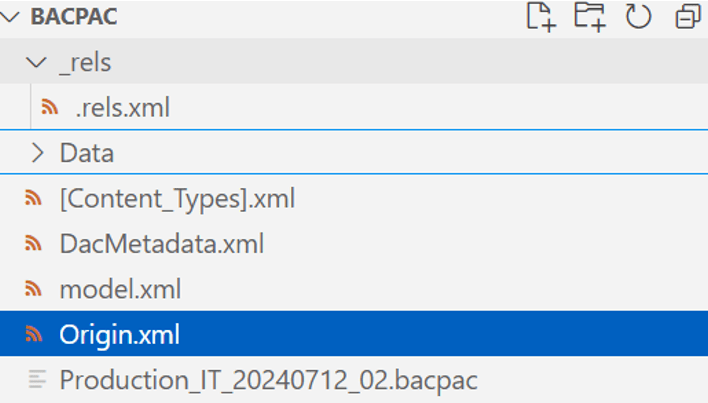
Which goodies are hidden in the bacpac?
ORIGIN.XML
The 2 relevant parts are the Azure SQL version and a statistics of the object content.
In this case, my bacpac, taken in July 2024, still reports an Azure SQL version belonging to SQL 2019 engine. That’s interesting.

And below a snippet of what is contained in the bacpac, summarized by object. No comment on that. Just a fun fact.
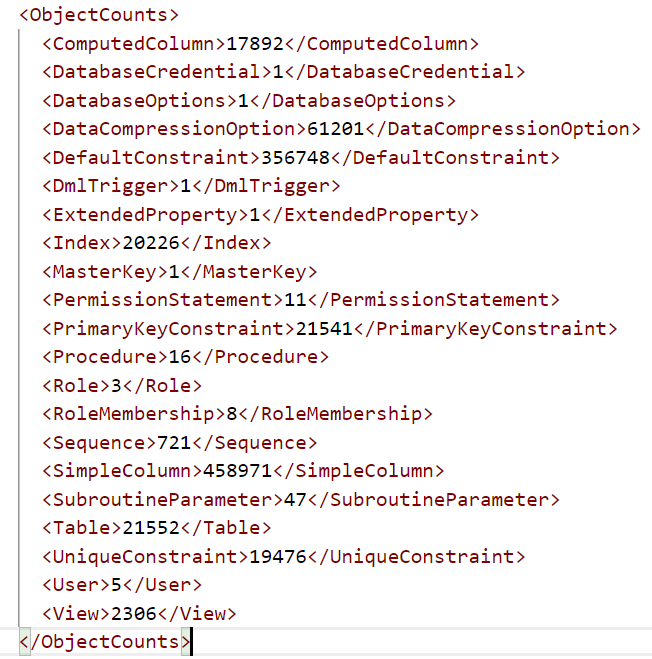
MODEL.XML
This is by far the most interesting one, together with Data table contents that we will see later.

On the top part of the XML file there are property (options) set for your database online. I have highlighted the ones that count most (at least imho).

Honestly, I would have expected that IsReadCommittedSnapshot was enabled. It is by default in all Azure SQL databases and it is one of the pillars of the great performance improvement achieved by enabling tri-state locking.
If you want to know a bit more about tri-state locking:
And now… the sad part. MAXDOP = 1.
Geezzzzz. Really?

When I fell in love with Microsoft Business Solutions Navision 3.70 A some moons ago, the good-old Hynek Muhlbacker and Jorg Stryk – 2 blessed men – were suggesting removing parallelism completely. It was year 2004 and SQL Server 2000.
Today, after 20+ years, technologies, hardware and software progressed a bit and Dynamics 365 Business Central could (should) take great benefit from enabling parallelism. A tiny bit, at least.
This parameter setting is imho quite outdated. But for an Online version I think I might understand the reason behind this conservative choice.
Let me argument that.
Imagine that you are working as database administrator of a very large database farm with Azure SQL in elastic pools. You are the one that has been entitled for the overall resource governance (CPU, Memory, I/O, etc.).
Enabling parallelism means opening the “bocchettone” (firehose, in English) for more processor usage and it might end up in some database cannibalizing shared resources. The solution would be to add more resources. That means more money on the plate.
It is not an easy choice, for Microsoft, I understand. More resources = more $$$ to spend.
But from a partner and customer perspective, I deeply hope that this could be improved, and parallelism enabled also for production databases in the online version since it is really needed, mainly when retrieving a large amount of data or sorting and other SQL operators that take great benefits from parallelism in reducing the estimated (and runtime) cost of the query.
FYI, in the on-premises version we typically set MAXDOP at database level to half of the max up to the max number of logical cores – as per Microsoft general recommendation -, depending on the environments and resources. Any of this choice, might not be optimal. Therefore, after a while, we are analyzing the cost of parallelism and wait statistics to make some adjustment, if and where needed. After all, tuning performance is a cycle and not just shooting a silver bullet…
In any case, trust me, we never set MAXDOP to 1 anymore.
Moreover, with SQL Server 2022, a feature called DOP Feedback has been introduced that might tune automatically the right query parallelism. To know more about it:
Degree of parallelism (DOP) feedback – SQL Server | Microsoft Learn
I have to admit that I haven’t experimented that myself (it is an Enterprise version feature) but I would love to do that, if time allows. I do not know, then, if this could be a valid addition to Dynamics 365 Business Central workload and query types (from the documentation seems not working when hinting).
DACMetadata.xml
Nothing worth noticing except the Azure SQL database name (e.g. db_bcprodweu_t13099994) where Txxxxxxxx could be the tenant id parameter specified to be mounted in the app database in multitenancy.
The rest is just the export date and time.

.RELS.XML and DATA
These are the data files in an optimized format and its relational definition (which data belongs to which table).
And now, instead of showing you other boring XML file snippets or Notepad++ screenshots (yawwwn), I better show you the restored bacpac and some interesting tables that you will not find inside a standard on-premises out-of-the-box Cronus database.
AUTOTUNE QUERIES
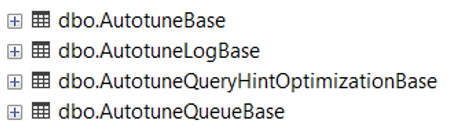
You do not have these in your on-premises deployment, right? What could be there for?… Am I a spoiler?
Hell, No! I am not spoiling anything, Microsoft declared using auto tuning features for database back at BC Techdays Keynote 2019. Check this out!
NAV TechDays 2019 – Opening Keynote (youtube.com)
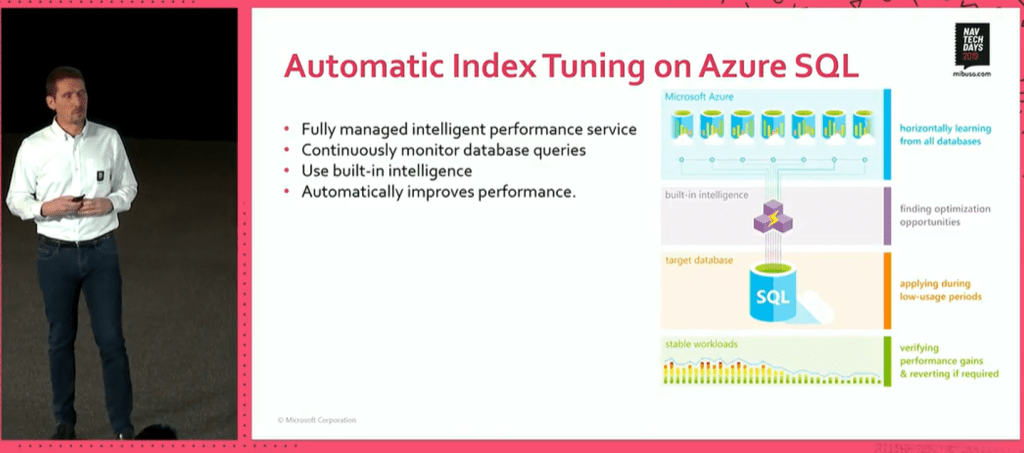
And to know more about this great feature: Automatic tuning overview – Azure SQL Database & Azure SQL Managed Instance | Microsoft Learn
And this is the content of dbo.AutotuneQueryHintOptimizationBase (at least for this restored bacpac)

DAMS service
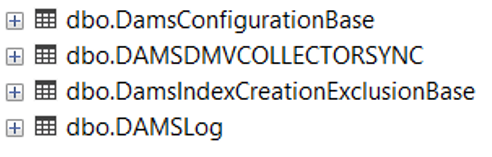
I was scratching my head but when I saw the content of dbo.DAMSDMVCOLLECTORSYNC.
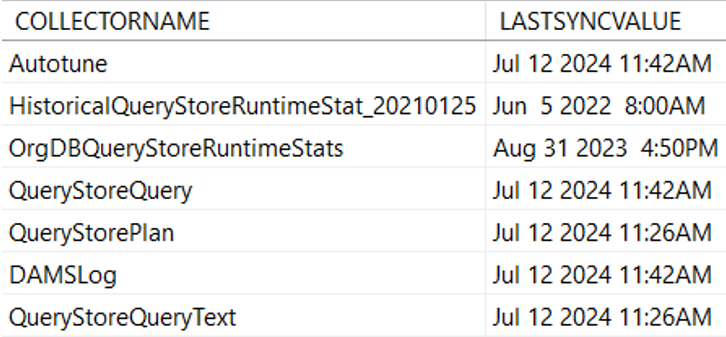
Then I recall of friends working with Dynamics 365 discussing about this specific Azure SQL service, tailored for the Microsoft Dynamics Azure SQL Database stack.
Again, I am NOT spoiling anything.
This was duly written and announced in this article dated back October 2020:
If you read through it, you will find exactly what DAMS is:
“To help Dynamics engineers and support organization during troubleshooting and maintenance events, another micro-service called Data Administration and Management Service (DAMS) has been developed to schedule and execute maintenance tasks and jobs like creating or rebuilding indexes to dynamically optimize changes in customer workloads. These tasks can span areas like performance improvements, transaction management, diagnostic data collection and query plan management.”
And if you want to know more about how deep in details this could work, have fun with this deep-dive document:
Automatically Indexing Millions of Databases in Microsoft Azure SQL Database
To summarize, for the peppins like me, there is a specific service tailored to monitor and automatic apply changes in every specific database to query execution plans, maintenance (statistics and indexes) with the aim of improving performance.
This is a super A-class service that, again, nobody could implement with the same level of expertise as Microsoft does. And it is only for online services, of course.

My thumbs are all up! (I said thumbs…)
dbo.LogfileUsage

I have no hints on this table content EXCEPT that it is exactly storing the result of a query like the following (where Production_ITxxx is the current restored database name)

Log file needs to be shrinked, at some point in time. Maybe this table is used to catch up the Log file dimension in order to determine when to shrink?. Or maybe used to determine latencies around the log file? Or both? This I do not know, honestly. But this table is there, in the online version, and store these values on purpose.
dbo.ReindexerExclusionList

Again, I do not know what is this for, but I could only guess it might be related to an automatic index reorganize / rebuild task associated with DAMS microservice (it is strange that is referring to PKs). These are just speculations, but I believe there is an appropriate maintenance policy also for index reorganize / rebuild.
(for whom, I would like to know more too – honestly -)
CONCLUSION
If you are running or intend to move to Dynamics 365 Business Central online then forget about SQL Server Agent or sleepless nights spent on avoid overlapping in maintenance job: Microsoft has it all set for for you already. And probably they could do it far better than you (and me – of course -).
Restoring an online bacpac in an on-premises environment is like opening a Nutella jar. So yummy and full of fat info:

- GOOD: Read Committed Snapshot Isolation is enabled by default in all databases. This is the real performance boost when tri-state locking is enabled.
- NOT THAT GOOD: MAXDOP = 1. If it is true for all production databases, I am not so happy about it. Honestly, I hope parallelism could be enabled in the (near) future.
- GOOD: Automatic tuning of query execution plans.
- VERY GOOD: DAMS. A best-in-class microservice that orchestrate specific maintenance tasks such as rebuild indexes, updating statics, shrinking, etc. Specifically tailored for Azure SQL Databases in the Dynamics product family.
To me, personally, I would like to know more WHEN (and, where possible, HOW) some of these database maintenance are happening, maybe with specific environmental telemetry signal. But this is another tale to tell, folks, and a stormy dark night is coming.

Sweet dreams to everyone.
 Dynamics 365 Business Central tales, myths, legends. And something serious.
Regarding the parallelism issue (MAXDOP) I’ve always heard (from the Gurus) it’s related to the type of queries NAV/BC does to SQL. They are too simple with fewer Joins, and it would be slower to try to parallelize the a query rather than have a single thread working to get the Data (specially on newer processors with higher clock speeds), and we could see that on our customers.
It’s true that BC does have a lot more joins (you just need an extension and you’ll have a JOIN). We always set MAXDOP to 2 regardless of CPU/Cores available on the server, I don’t believe the will be much benefit from setting to a higher value than that.
LikeLiked by 1 person
MAXDOP = 2 means letting SQL enable investigating parallel execution plans and approve the ones that fit most. It is parallelism and some queries might benefit from this. It could be the right balance with SaaS – if DOP feedback won’t be a successfull implementation for BC-. I would accept that more than MAXDOP = 1. Within on-prem we have used a different approach: half of the logical cores and then we analyse wait stats and parallel queries (if there are performance problems, of course). In my experience, not all customers are the same = not all workloads are the same.
LikeLike