

Apologize for a one-month+ silence but during go-live season, as Bradely Cooper stated in “Silver Lining playbook”:
“… It took so long for me to catch up… I just got stuck.
Pat.
…I wrote that one week ago…”

Cut the crap, you stupid romantic…
Aaaand now, ladies and chesterfield, the already buzzed brand new and shiny AL Statement: rec.truncate().
The concept is super simple and magic: a table with gazillions of records will take light years to be deleted with rows one by one and it will be done under transaction, hence with a giga log file growth, but with truncate… Puff… gone in milliseconds (IF all conditions are met).
The AL command is based on SQL Server TRUNCATE TABLE statement:
TRUNCATE TABLE (Transact-SQL) – SQL Server | Microsoft Learn
This T-SQL statement has its own constraints; PLUS consider and take note of the ones that product group enlisted and relates to the AL Statement:
- AL Table is not a SQL table
- AL Table is a system or virtual table
- AL Truncate is in a try function
- AL security filters are active and applied to the record
- There are subscribers to OnBeforeDelete / OnAfterDelete events
- Table has Media fields (Media or MediaSet)
- Too many rows on the tables are Marked
- There are filters on one or more FlowFields
If all these conditions are met, the moon is aligned by 42 degrees and Orion constellation enters in Saturn, then truncate will do its magic. Otherwise, it will fall back to the lengthy but safe row-by-row deletion that are part of the DeletAll mambo-jumbo.

To easily demonstrate two simple scenarios when do and don’t use truncate, download, deploy and click on “Rec.Truncate Demo” from the Demo app that you can find here:
https://github.com/duiliotacconi/DT.AL/tree/main/BC27-Performance-Features
Demo 1: GO DO (and not godo, in Italian… it has ANOTHER meaning… or moaning…😊)
Truncate WITHOUT Filters
Try with e.g. 50.000 records.
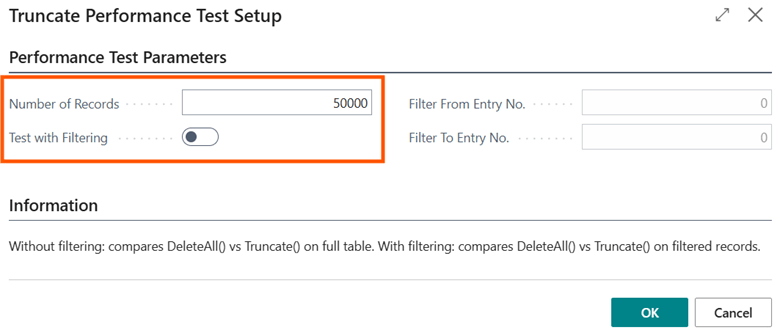
When you click OK, the application will
- Generate 50K records
- Run Rec.DeletAll();
- Take note of the time spent
- Generate 50K records
- Run Rec.Truncate();
- Take note of the time spent
This is a typical output:
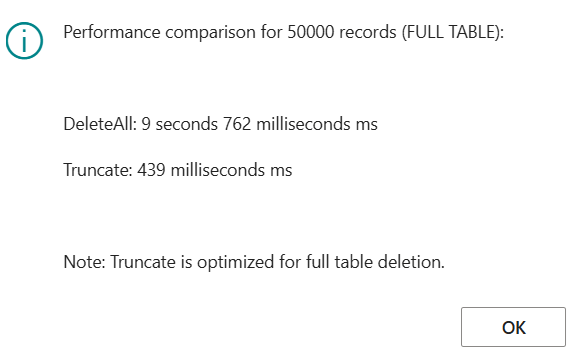

And the more record you have, the more indexes you have, the more indexed views (V-SIFT) you have… the higher it will take the Rec.DeleteAll(); compared to Rec.Truncate();
This statement is, then, super-efficient in clearing up ALL records in log tables.
DEMO 2. Aka PLEASE DON’T ! (or, better, BE CAREFUL, I TOLD YOU!)
Truncate WITH Filters
Try with e.g. 50.000 records and deletion filters from Entry No. 7500 to Entry No. 8500 (just 1K record deleted over 50K).
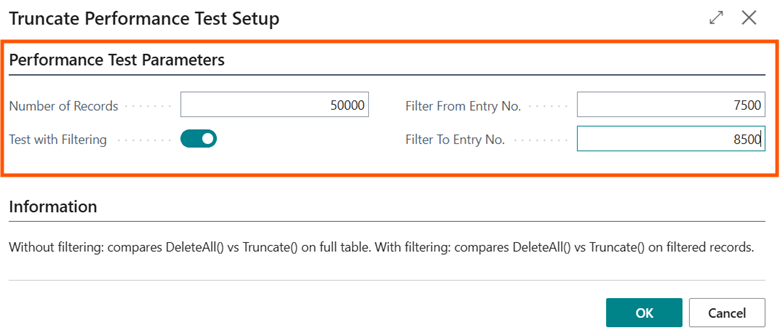
When you click OK, the application will
- Generate 50K records
- Run Rec.DeletAll(); on a SetRange based on Fom / To Entry No.
- Take note of the time spent
- Generate 50K records
- Run Rec.Truncate(); on a SetRange based on from / to Entry No.
- Take note of the time spent
This is a typical output:
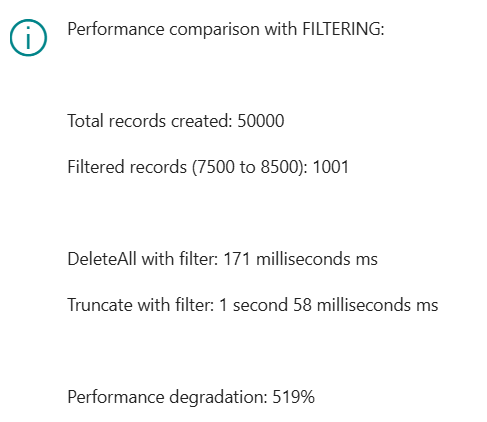
It is dramatically worse than going for a Delete() / DeleteAll().
And this ends up a very easy test to showcase where truncate really shines, and its dark side.

Internally, we have tested this statement widely and applied it already to some of our AppSource apps, where typically you have staging tables that are populated for e.g. simulations or buffers.
These tables are the result of complex and exotic aggregations from different sources and they might contain thousands or even hundreds of thousands of records.
These tables are “love it or leave it”. You want to keep all record or you want them to be completely empty to be filled in again and again.
Bottom line. These are our internal labs results:
“The SQL Truncate method is instantaneous because it deletes all the content of a table by unlinking the database pages, but its limitation is the inability to apply filters.
BC’s Truncate implementation allows applying filters on what to delete using a trick:
- It creates a SQL table identical to the one we want to clean, with only the primary key
- It fills the staging table with the records we want to keep (thus applying an inversion/negation of the filters)
- It disables all SIFTs
- It executes the Truncate
- It repopulates the original table with the saved records
- It recreates all secondary indexes and SIFTs
- It deletes the temporary table
All of this requires sometimes a discrete workload for SQL, and the typical question to answer is: if there is the need to delete only a portion of a table, when is it better to use Rec.DeleteAll and when is it better to use Rec.truncate?
Running a simulation on:
- Local On-Prem installation
- A very generous datafile and transaction log sizes to avoid expansions during the test
- MAXDOP 5
- Using an “Item Ledger Entry” clone table with 1 million records populated with a distribution like what you might find in a real installation.
Tests were conducted based on deleting with both methods (DeleteAll and Truncate) and increasing number of records (at 20% intervals, so 200 thousand more records each time), testing both scenarios where the table has only the primary key as well as the scenario with all indexes (SIFTs included) defined by the standard “Item Ledger Entry.”
During the tests, it was also measured how many MBytes SQL Server wrote to disk to execute the commands, considering that the more it writes, the worse the performance (duration) would have been.
Analyzing results, it has been found that when cleaning a table with few indexes, the truncate method becomes advantageous if deleting at least 50%–60% of the content. If deleting less, the operation of saving and restoring the records we want to keep negates the advantages of Rec.truncate. In such cases, it would be better to privilege row-by-row DeleteAll, instead. “
CONSIDERATIONS
Honestly? With on-premises, you run the T-SQL command directly in the database through a script, right after a full backup of the database and/or before moving the table content somewhere else. Online it is a good addition to have a fast way to keep the database skinny (capacity costs $$$) and could also be used proficiently in specific tables and, of course, conditions.
There are 2 main points to keep in mind:
- Remember its Constraints.
Be sure that all the conditions are met before doing a Rec.Truncate(), otherwise it will fall back to a lengthy (and locking) Deleteall().
- If filtered, check the number of records to be deleted and decide what to do.
When all constraints are met, truncation works blazing fast when you leave no records on the table. Then it goes from blazing fast to fast, from fast to slow, from fast to deadly slow, and so on, considering the number of records that are left in the table and the metadata definition (how many indexes, V-SIFTs, etc.).
For this reason, remember to test, test and test again all possible scenarios.
If you fumble in running a very long locking time during Rec.Truncate(); most probably it is because you were phasing out just a small number of records compared to a Goliath table
And that will be the exact time where my words will resonate loud in your head: “I TOLD YOU!”.

 Dynamics 365 Business Central tales, myths, legends. And something serious.