
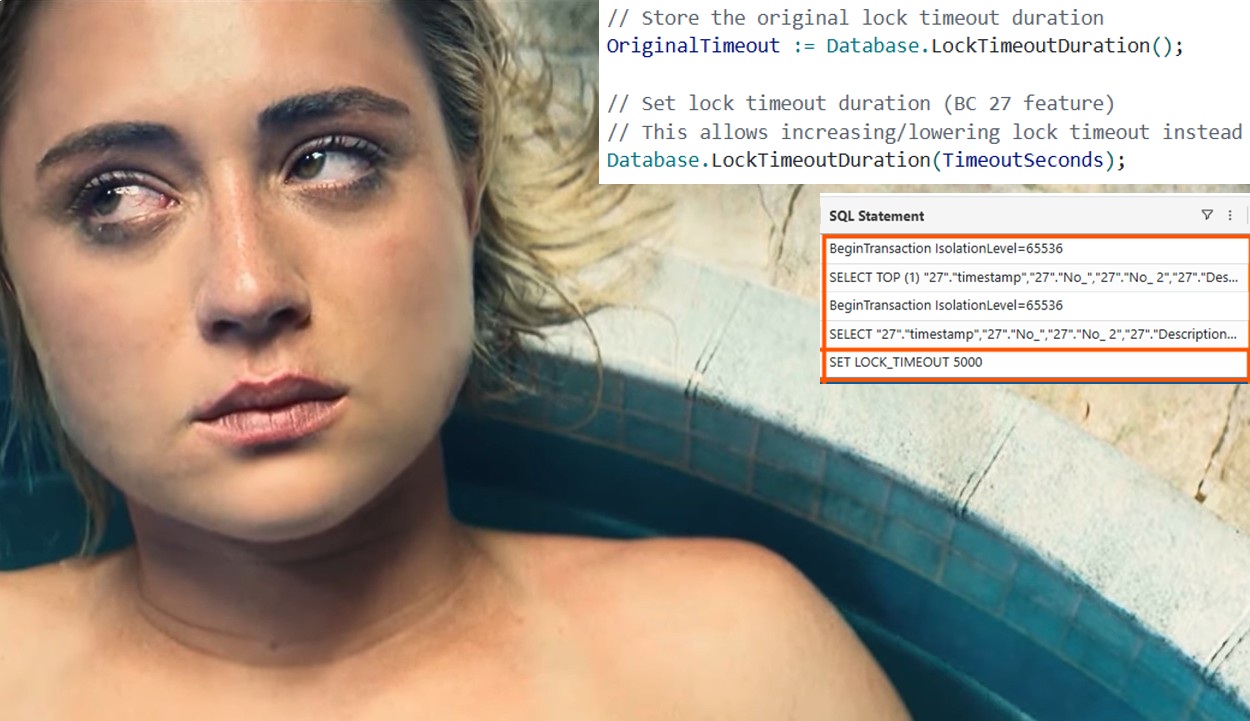
In the online environment, the lock timeout duration is set to 30 seconds and, until now, cannot be changed anywhere.
On-premises there is a parameter in CustomSettings.Config to override the default value, called SqlLockTimeoutOverride:

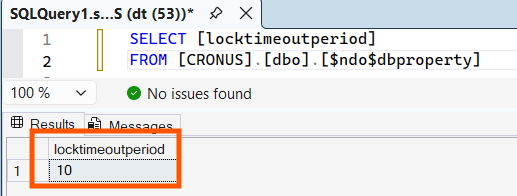
The default value is stored in $ndo$dbproperty table, locktimeoutperiod field (that is set, in Dynamics 365 Business Central 2025 Wave 2 aka v27 Cronus Database, to 10 seconds). See below:
Is the online value too high? Is the on-prem value too low?…
The answer is trivial: it depends BUT, at least, it is CONSISTENT across the database, and it is a global value for all the sessions and statements bound to the same Dynamics 365 Business Central Service.

Since Dynamics 365 Business Central 2025 Wave 2 (version 27), it is possible to override the value via AL Code within a specific statement(-ish) and elevate or reduce the lock timeout period at will (and considering Murphy’s Law, this will surely be the transaction started by one of the guys that is spending most of the time at the coffee machine…).
See more:
Database.LockTimeoutDuration([Integer]) Method – Business Central | Microsoft Learn
To demonstrate how it works run the “Lock Timeout Demo” action from the sample demo that you will find here
https://github.com/duiliotacconi/DT.AL/tree/main/BC27-Performance-Features:
A clear prompt will appear stating that a background session will be created keeping an Item explicitly locked for 15 seconds
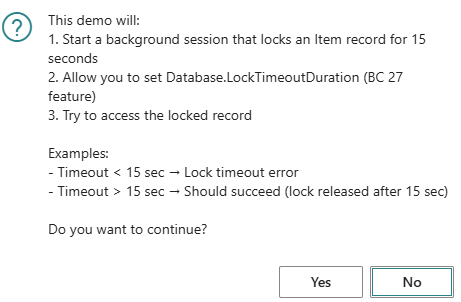
If you choose to continue (click Yes – what else…-), it will prompt you to enter a timeout duration value:

You can experiment with lock timeout values lower to 15 (the attempted duration of the lock in a separate background session) to demonstrate the occurrence of a lock timeout
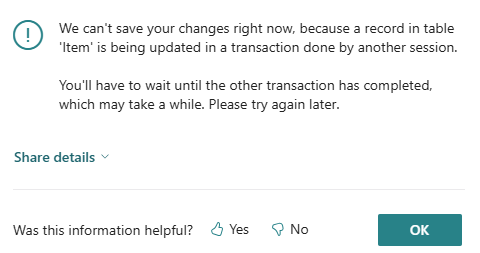
You might also want to play with lock timeouts higher than 15 seconds, where the demo will change the description of the item with the current value and display the item card as succeeded proof of concept.
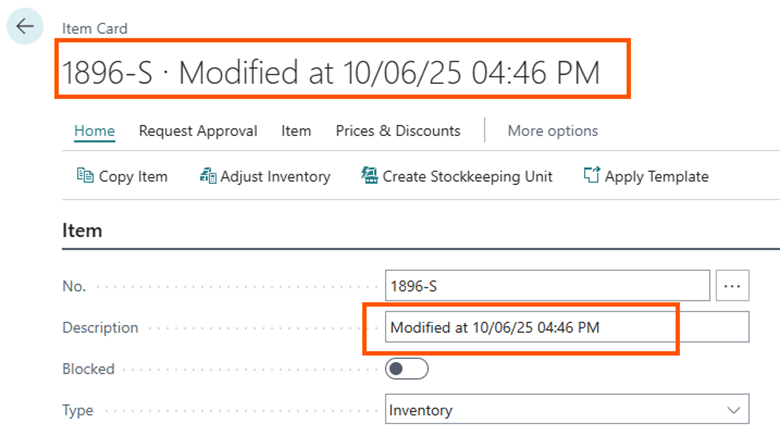
Digging behind the scenes, the main part of the code is the following:

That is showcasing get / set lock timeout duration (using a fully vibe coding – Gen-V – generated demo sample). Hope you loved it!

But what is REALLY happening under the hood (at the database level)?
Running a SQL Profiler trace on-prem (soooo boring!) or, even better, running additional logging and telemetry behind the scenes (online or on-prem), you might catch a
SET LOCK_TIMEOUT <Value>
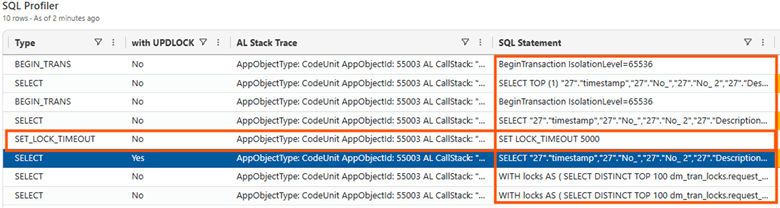
See more : SET LOCK_TIMEOUT (Transact-SQL) – SQL Server | Microsoft Learn
The SET statements change the current session handling of specific information. In this specific case, it changes the duration of a timeout when trying to acquire a lock on a specific resource (gosh… this is too techy…).
If you experiment a bit with On-Premises and SQL profiler trace behind the scenes, you might notice that a Lock Timeout is set back to the original value (30 seconds online and 10 seconds on-premises – if you have not changed service settings -) by the platform as soon as the thread stops.
How far can you go in setting the lock timeout? Is that Infinite?… Well, try to set it to 0.
If you set Lock Timeout Duration to 0, accordingly to SQL documentation, it could wait an infinite time BUT, within Dynamics 365 Business Central, the platform changed to a specific max value (it is for good… to avoid a technical massacre)
Lock Timeout Duration Max Value = 1710000 ms = 28.5 minutes
Where did I get this value? SQL Server Profiler in an On-Premises deployment, darling.

Why this value? Don’t ask … Just KISS (“Don’t talk, just kiss” cit. Right Said Fred).

There is a reason to this value : it is 10% below the max command timeout to ensure Microsoft could distinguish between lock timeout and command timeout. In the case above, the typical command timeout is set to 1900 seconds = 31 minutes and 40 seconds.
CONSIDERATIONS
Let me reformulate on my own words.
Changing the lock timeout means changing how much time a query (hence a user or a non-interactive session or – more modern – an agent) could wait to grab a resource that is currently locked.
As in life, there are consequences in setting the value
- TOO LOW

if you set this value too low, your user – or whatever entity is holding the session – might receive more timeout errors = restarting the job they were doing (and rollbacks) = more complaints.
- TOO HIGH

This is serious. If you elevate this value and let users wait increasingly, you are also increasing the risk of having longer blocks hence blocking chains may arise together with a resurrection of silent deadlocks (due to high locking time).
If you think twice what I wrote, this is NOT an apply-to-all solution to locking problem per-se but, probably, it is more intended for very special business-critical procedures that might encounter lock timeouts during their executions. And you want them to be executed, no matter what.
In such specific and spot case, changing lock timeout is a sort of safeguard to make sure they ARE (or vividly pretend to be) executed.
Remember the evergreen motto: with great power (define a lock timeout) comes great responsibility (you are accountable of the consequences: good and bad). In real word scenarios, I would use this feature VERY carefully or NOT USING IT AT ALL, if you have not crystal clear the overall landscape of your environment AND the consequences of changing lock timeouts. In an extensible world, changing the timeout to a discrete higher value could be equivalent of calling for troubles.
 Dynamics 365 Business Central tales, myths, legends. And something serious.
Leave a comment