

Legacy posting has been performed, for ages, following the primary key sorting order: (“Document Type”, “Document No.”, “Line No.”).
And when it is time to post, it posts one document at the time. So, now, the sorting order is following the “Line No.”. With very heavy concurrency and/or in stretched exotic scenarios, processing by following just the “Line No.”, it is prone to generate deadlocks.
And for the ones that are unfamiliar with deadlocks, they are typically caused by wrong resource locking order. Better say dissimilar or different locking order – to be politically correct – of resources that are freely added in a document.
And since WHEN exactly you know that? Since EVER.
(applause)
In Dynamics 365 Business Central 2025 Wave 2 (v27) there is another GENERATIONAL limitation that is falling down. Better say “partially” falling – and I’ll explain this later on, don’t get anxious, Rome wasn’t built in a day -.
Starting from Dynamics 365 Business Central 2025 Wave 2 (version 27), if you have already enabled in previous release, Dynamics 365 Business Central 2025 Wave 1 (version 26), or enabling from Feature Management: “Enable multiple users to post item ledger entries and value entries at the same time”
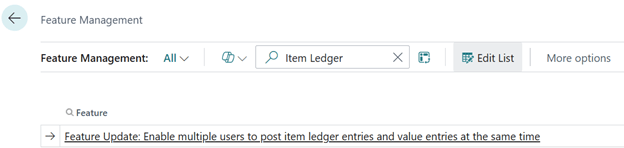
you are also triggering a different sorting order for sales and purchase postings based on “Type”, “Line No.”
You can read more about it here:
Sort lines by type in sales and purchase postings | Microsoft Learn

Well, initially I was thinking of a strict posting with a sort order with “Type”, “No.” to be very consistent in every single posting but it seems like some prepayment scenario does not digest very well this kind of sorting, therefore it has been implemented using Type, “Line No.”. (instead of changing the prepayment scenarios… 😉)
Ok. Ok. Cut the crap and let’s demonstrate easily these changes through the demo app (you can download it here : https://github.com/duiliotacconi/DT.AL/tree/main/BC27-Performance-Features ) using the “Posting Order Demo” action.
What the action does is the following:
- Create / update some Item, G/L Account and Resource
- Create a Sales Order with a random “Type” like e.g. shown below in “Line No. ordering:
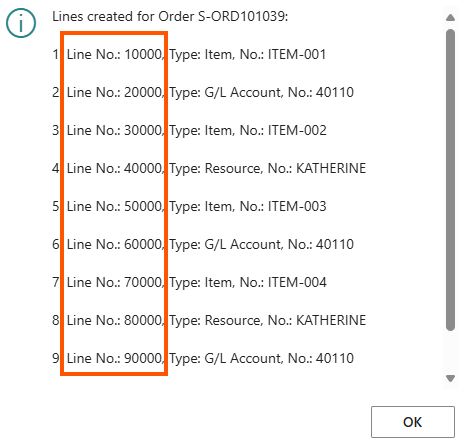
And simply subscribe to the event “OnPostSalesLineOnBeforePostSalesLine” to store the posting order:
    [EventSubscriber(ObjectType::Codeunit, Codeunit::"Sales-Post", 'OnPostSalesLineOnBeforePostSalesLine', '', false, false)]
    local procedure OnPostSalesLineOnBeforePostSalesLine(SalesHeader: Record "Sales Header"; var SalesLine: Record "Sales Line")
You will clearly notice that the posting order is by “Type”, “Line No.” (e.g. G/L Account lines go first, then Item, then Resource, etc.)

And this is just due to the following code lines in ProcessPostingLines procedure in codeunit Sales-Post (and you will find the very similar code lines in Purchase-Post codeunit. Do you see the Setcurrentkey AL Statement?…).
        SalesLinesProcessed := false;
        if not InventorySetup.UseLegacyPosting() then
            TempSalesLineGlobal.SetCurrentKey(Type, "Line No.");
        if TempSalesLineGlobal.FindSet() then
            repeat

Just as fresh reminder, these are the Sales Line Type (and remember the same order logic applies to Purchase as well).
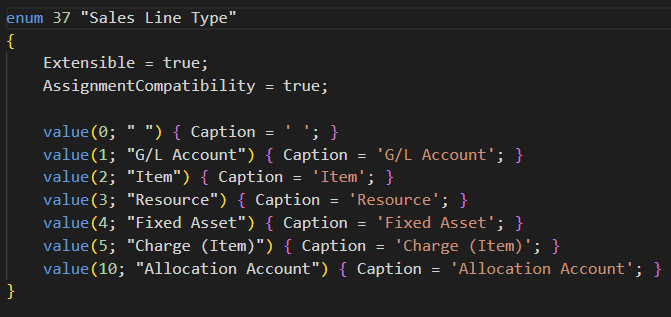
CONSIDERATIONS
This feature seems to me a nice touch on the improved concurrency when posting sales and purchase documents, but it might put at risk already existing Per Tenant Extensions (PTE) that are relying on the old “Line No.” order. These must be refactored.
I am pretty sure that some of you will fumble in this – better say, your automated tests will do -. This is the reason why I strongly suggest enabling the Feature Management flag in advance and widely test all your postings routines before upgrading to Dynamics Business Central 2025 Wave 2.
But even if you do not have a solid testing framework in place there is always an easy mitigation (until the feature will be mandatory): disable the Feature Management key “Enable multiple users to post item ledger entries and value entries at the same time”.
Keep in mind that disabling that key, the application will fall back to old legacy posting, hence a potential regression (resurrection) of lock timeouts, typically in Item Ledger Entry table, in high concurrency scenarios.
 Dynamics 365 Business Central tales, myths, legends. And something serious.