

Took me quite a while (close to 9 weeks and half) to pack up this blog post, due to a very tight and busy schedule. Now that I am on vacation, I would like to provide you my way to determine what might be the best Update Window in order to take 2 birds with a stone (application and, statistically, platform hotfixes in the same time window).
Microsoft, like every serious cloud service provider, has a fast hotfix deployment service.
It is a serious top-class service strategy, believe me.
None could handle 50K+ (and counting) production environments the way Microsoft does.
This hotfix deployment service involves mainly 2 types of patches:
- APPLICATION Hotfix
These are code changes and are typically deployed using a very sophisticated mechanism that might involve also RAD (Rapid Application Development). See – for your eyes only aka don’t-do-this-at-home -:
Work with Rapid Application Development – Business Central | Microsoft Learn
Partners and customers have full control over deployment time (except for very super rare important ones), since:
- Application Hotfixes typically observe the 6-hours Update Window setup per environment in Tenant Admin Center (TAC).
- You can keep track of Application Hotfix deployment using a specific signal in telemetry (LC0159). See more:
Analyzing Environment Lifecycle Trace Telemetry – Business Central | Microsoft Learn
- PLATFORM (and/or service) Hotfix
The damn bad a**
Follow me. Concentrate.
Ready?…
Steady?…
Go.

I am starting with a definition.
These are critical components and/or platform changes that are applied node by node in the cluster that is serving multiple customers. Since they are serving a variety of different environments, with different settings, its deployment may not observe the Update Window setup in TAC and it is entirely decided by Microsoft.
The current methodology applied by Microsoft is to gently encourage sessions to finish their job by sending a friendly message in the UI stating, “get away or I’ll kick you out!”.
Kidding. See below a typical message:
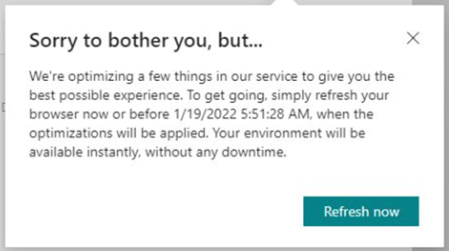
This is quite scary for the users, that is why – accordingly to Microsoft –
“Platform Hotfix are deployed outside of typical business hours for the localization(s) of environments on that cluster”
Hold on a second. A message in the UI?… What about background sessions and web services? They have no eyes, no ears and, mostly, no UI.
HMMMM!
You must play with the card you have. Right? No bluffing allowed.

Now you, me, everyone knows how the platform hotfixes are applied. What’s next?
AH. You would like to know WHEN they are applied. ‘Course you want… Let me reformulate what is on your mind.
What is the best update window to be applied for your customer to have statistically the smaller number of platform hotfix applied? = reduce or even zero-ing the disruption of your Job Queue / Scheduled Task / etc. due to Microsoft patching the platform.
Only telemetry can answer this question.
What I have created is a KQL query that:
- Determine all component version changes due to application minor or major update (these should be removed from the series since they are intended and controlled).
- Determine all component version changes.
- Apply the appropriate conversion from UTC to the relevant time zone (in my case, Europe/Rome).
- Group them by hour of deployment.
let Upgrades = (
    traces
    | where customDimensions.eventId == 'AL0000EJA'
    | project timestamp
        , entraTenantId = tostring(customDimensions.aadTenantId)
        , environmentType = tostring(customDimensions.environmentType)
        , environmentName = tostring(customDimensions.environmentName)
        , session_Id
        , componentVersion = tostring(customDimensions.componentVersion)
    | distinct entraTenantId, environmentType, environmentName, componentVersion
);
let PlatformUpdates = (traces
    | extend entraTenantId = tostring(customDimensions.aadTenantId)
        , environmentName = tostring( customDimensions.environmentName )
        , environmentType = tostring(customDimensions.environmentType)
        , componentVersion = tostring(customDimensions.componentVersion)
    | where componentVersion <> ""
    | summarize max(bin(timestamp,1sec)) by entraTenantId, environmentType, environmentName, componentVersion
);
PlatformUpdates
| join kind=leftanti Upgrades on //leftanti removes the matching records
    $left.entraTenantId == $right.entraTenantId,
    $left.environmentType == $right.environmentType,
    $left.environmentName == $right.environmentName,
    $left.componentVersion == $right.componentVersion
| where max_timestamp < ago(1h) //to remove the latest record (the current component version)
| sort by max_timestamp desc
| extend maxTimestampInLocalTime = datetime_utc_to_local(max_timestamp,"Europe/Rome") //From UTC to local time
| extend hour = hourofday(maxTimestampInLocalTime)
| summarize occurrance = count() by hour
| sort by hour asc
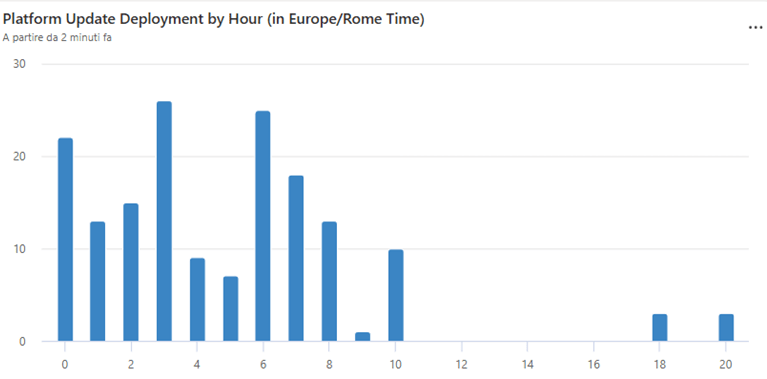
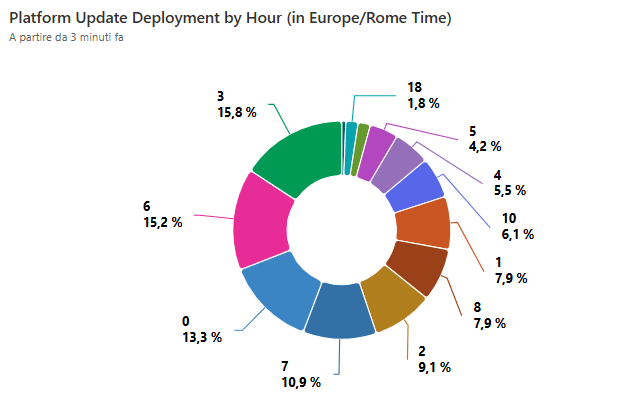
Running this query against a discrete bunch of IT localized environments in the same Application Insights ingestion point resulted in the following:
And asking Claude what’s the best 3, 4, 5, and 6 range hour window, there goes the answer
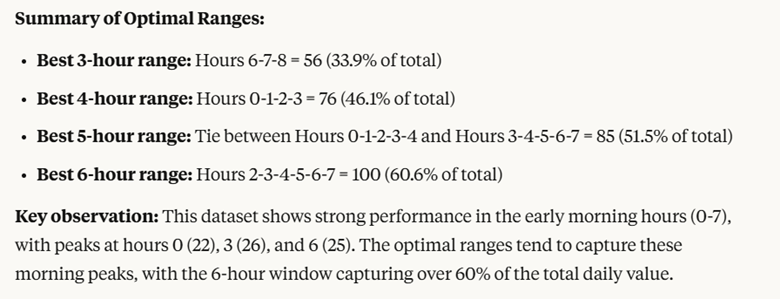
Quite impressive!

…and it is not over.
While having our Aperitivo on the beach in Pesaro, my wife told me “… maybe worth checking also the DAY, the platform are applied”. Wise girl! … Why not?

By simply changing the last part of the query above and instead of hour:
| extend day = substring(tostring(dayofweek(maxTimestampInLocalTime)),0,1)
| extend weekDay = case(
    day == "1", "Monday",
    day == "2", "Tuesday",
    day == "3", "Wednesday",
    day == "4", "Thursday",
    day == "5", "Friday",
    day == "6", "Saturday",
    day == "0", "Sunday",
    "DoomsDay" //Just for fun. It should not happen. Maybe.
)
| summarize Occurrance = count() by weekDay, day
| sort by day asc
| project-away day
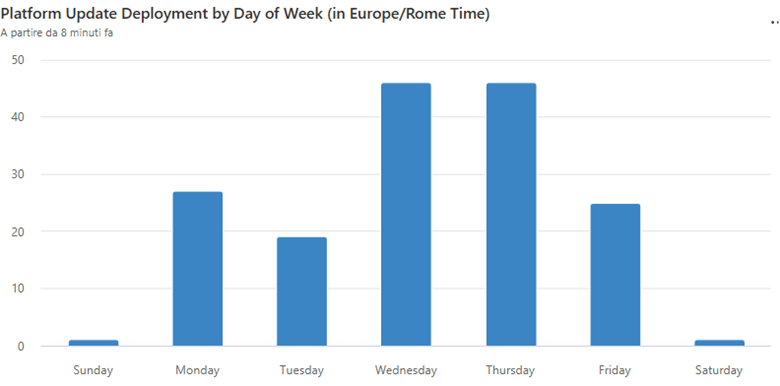
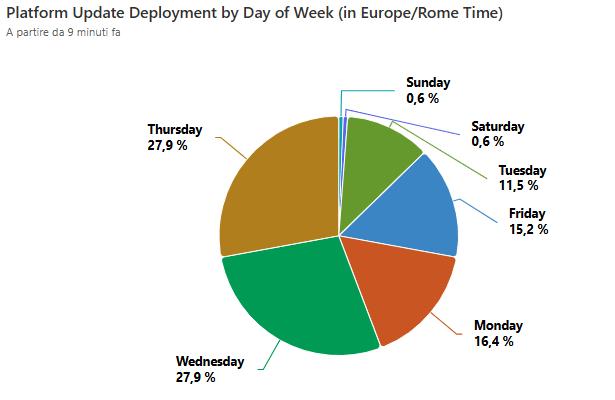
As you can see, platform hotfix pipelines very rarely run on Saturday or Sunday. But at the weekend, there might be also other maintenance happening (or simply because there is a reduction in the workforce to tackle issues, if they ever comes). So, keep this also in mind.
CONCLUSION AND TAKEAWAYS
If you want to plan the best update window for your customer, you must use telemetry to better understand when platform hotfixes are applied and avoid critical long running business processes (e.g. MRP calculation) being broken, every now and then, by them. See below a typical error message in Job Queue Log Entry record, when these happens:
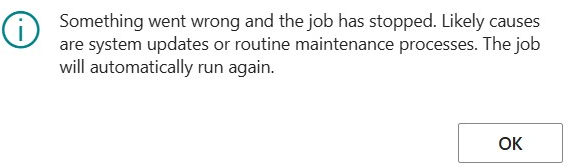
(and if your job is running 4/5 hours, the fact that will automatically run again is more than scary. It is EVIL.).
For example, If you have an Italian (IT) localized environment (the hours are related to Europe\Rome current timezone):
- The statistically best period of 6 hours to set the update window to also include most platform hotfixes is between 2 AM to 8 AM. But do not keep this as written in the stone, the distribution evidence 3 peaks: 0 – 3 – 6 AM.
- Up until midnight, hardly Microsoft pushes platform hotfixes. Privilege this period, for your background sessions, as much as you could.
- Statistically, Tuesday and Friday are the days where Microsoft pushes less platform hotfixes.
- Stay away from Wednesday and Thursday. These are the ones where Microsoft deploy most.
- Saturday and Sunday are unlikely subjects of platform changes.
Bottom line. If you have your own environment(s), I would strongly suggest you to run the queries above to determine what’s the distribution of platform hotfix and decide how to proceed with the Job Queue scheduling.
My own summer wishes to Microsoft:
- Add a smaller update window (e.g. 1-hour) for Application hotfixes in Tenant Admin Center. 6-hour is a bit too much for quite small patches.
- Review and refactor the Platform hotfix patching strategy in order to wait max 12 hours (the typical default session timeout) and in the meantime check if there are no active sessions in the node that should receive the patch. A sort of temporary quarantine, or something on this flavor.

 Dynamics 365 Business Central tales, myths, legends. And something serious.
Leave a comment