
Real life scenario related to a couple of great features introduced in the Armageddon version 26.x: a less-locking inventory posting scenario and the capability of avoiding unnecessary FlowFields calculations in pages.
Cut the crap and show me the money!
AH. BTW this is serious so, for this time, poker face and sorry no (just few) memes.
A LESS-LOCKING INVENTORY POSTING
Let’s take some picture of this online production environment
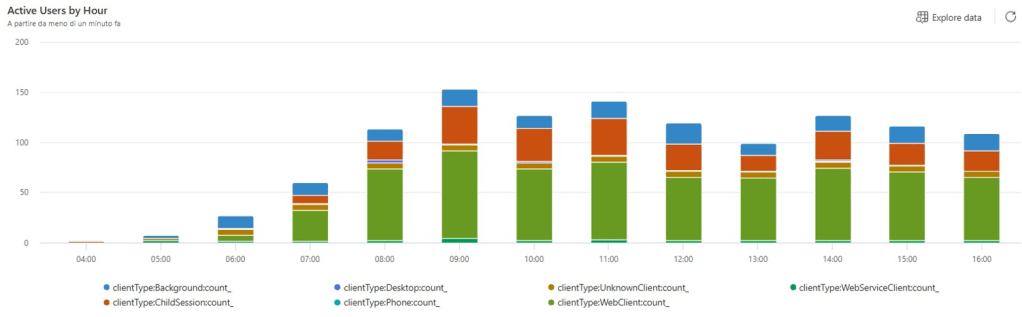
There are constantly 70+ Users / hour, on average.
But I must pray what I preach @BCTechdays: measure by sessions. There are 2K background sessions / hour that refer to different integrations (WMS, MES, BC2ADLS and other typical or even more exotic ones).

and this is an online environment, live since January 2025, started with version 25.x (Dynamics 365 Business Central 2024 Wave 2, for those who love it longer).
Rule #2 the type and quality of the transactions.
You might observe the number and duration of Long Running Queries (LRQ) per 10 minutes bucket, on a typical day before the upgrade. Both graphs are divided by SELECT with isolation levels different than UPDLOCK and the locking ones (SELECT with UPDLOCK, INSERT, UPDATE, DELETE, and others)

When you have such complex manufacturing scenarios, Item Ledger Entry is always on top of the list of locked tables, lock timeout by tables and deadlock by tables. And everyone (web client, background and other type of sessions) is trying to squeeze their record into it.
Just to give you an idea, these were the overall (since go-live) deadlocks and lock timeouts, before updating.
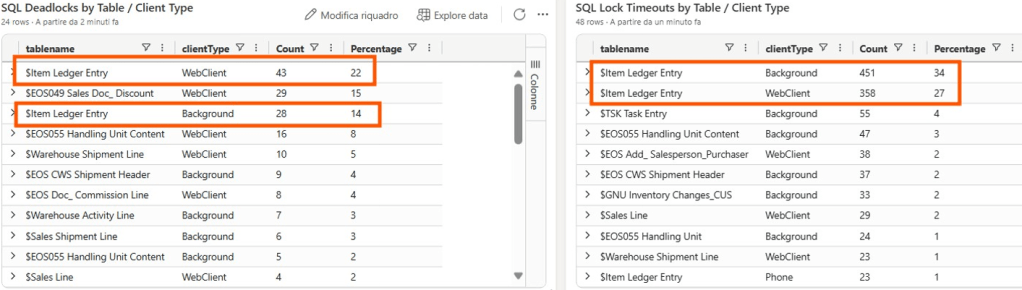
It was a tough situation, I must admit, where we strongly needed higher concurrency to make this eagle fly high.

In early June 2025, the environment has been updated to 26.1 and – again – praying what I preach, we warmly recommended and obviously (and proudly) enabled the following features ahead of time:

In this scenario, job ledger entries and resource ledger entries are not quite relevant but I am simply taking the chance to showcase very good features that should be enabled in every environment. No matter what. It is like starting with the right foot every morning. 😉
The outcome? Item Ledger Entry deadlocks and lock timeouts… puff. Gone with the wind.
See below 1+ month approx. since upgrade.
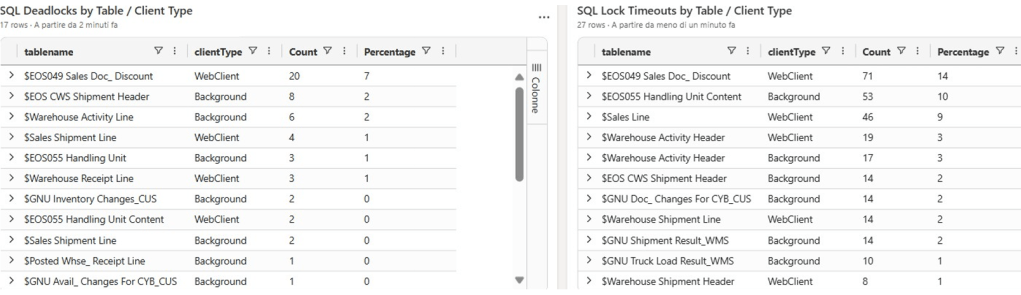
Now you see it… Now you don’t.
Was that simple? Finger snap?
Should I lie to you? “Oh yes, it was like walking barefoot in a bed full of petals” …
Ehm. No. Rewind and rephrasing. It was more like Bon Jovi’s:
“lay down on a bed of roses (thorns included)”.
The new inventory posting engine that makes use of Number Sequence object changed the transaction scenario in terms of locking order, opening to a spike in brand new different deadlocks that have never been seen before.
And, to be honest, I have omitted to count them in the deadlock and lock timeout picture above, since we are eradicating them like bad weeds. They have to die with a smile!

Item Ledger entry was not anymore the first to be locked but – surprise, surprise – a table in one of the 3rd party app that was spotted easily right after the upgrade happened and fixed. Such apps seem not being a harm until the update kicked in, because Item Ledger Entry was the first ring in the deadlock chain to be hit.
Like a silent alien in the transaction stomach.
Now that the first ring is broken (or liquified in Mount Doom, if you prefer), it opened to the next one in the chain.
Since such Apps are controlled by us, these have been quickly optimized using a MotoGP tire style treatment:

Soft. ReadIsolation. One part of the code was a bit rusty (because of the typical Italian motto “squadra che vince, non si cambia”…) and have been revamped and renewed by deprecating locktable and applying the appropriate isolation level where needed. Attaboy!
Medium. SIFT. There have been SIFT that could / should be optimized. One has been turned off (MaintainSIFTIndex = false) and the second one… Well, we have applied the tricky strategy of “SIFT Bucket No.” used by Microsoft too.
But with a touch of Italian fantasia. (just because it was needed…)
“SIFT Bucket No.” := sessionid mod 5;Why are we using sessionid?
Well, there are no register in this app, nor something quite close to it. This is the reason why we had to fall back using sessionid. I know that there might be multiple NSTs or session active since ages but I am confident that it would work out good in statistically bash down the possibility of deadlocks within this environment.
Hard. Autoincrement. This is the typical “I told you”Moment. Many goodfella think that Autoincrement is the best choice over the different variety of choices to increase numbers. I know it is super-fast both to implement and in performance, but it has its own thorns.
First and foremost: it breaks bulk insert. And when latency matters (and in the online version, it matters A LOT), bulk insert is gold.
Second: autoincrement lies in the SQL table data definition. Hence you will have a hard time changing it in the code, if needed (a real breaking change, hard to handle).
For these reasons, I am the one that tends to implement Number Sequence instead. And request number ranges, where possible and with caution. ‘Course.
Keeping a long story short, today we have an environment where there are still just a few deadlocks, and we are happily running with a very limited amount of sporadic timeout. Nothing compared to the 25.x situation. And deadlocks and lock timeouts will be further subject of analysis and reviews in the upcoming weeks.
AVOID INVISIBLE FLOW FIELDS CALCULATIONS
The second goodie with version 26.x is the capability of avoiding unnecessary calculations of FlowFields in pages. This refers to FlowField columns whose visibility is set explicitly or dynamically to false.
And telemetry never (ever) lies.
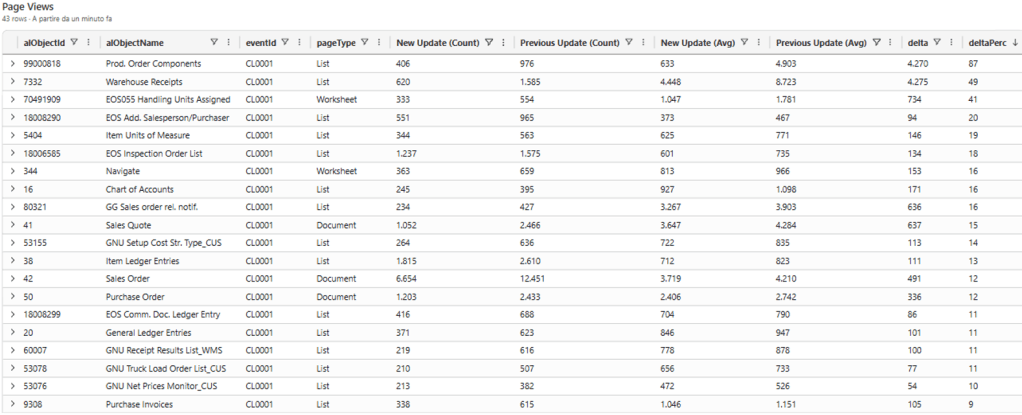
With a very simple pivot, it is possible to calculate the number of occurrences and average duration considering two different periods.
Just to prove the point, I am concentrating on Lists and few other page types, and the results are self-explaining. Previous update means 25.x, New Update means 26.x. I took the number of occurrences per period (Count) and the average time in milliseconds. Delta and delta % are the raw and percentage difference between the different period’s average times.
The difference, sometimes, is HUGE. (overall when you have invisible FlowFields that does not have a supporting index)
Was it that simple? Any downsides?
This time yes, it was that simple and no downsides. Except for a stupid thing.
There is a standard column in the IT chart of accounts that depends on another standard FlowField (the triumph of FlowField Matrioska…). The second FlowField is – guess what?… – hidden in the standard application.
Turning on the feature to calculate only visible FlowField, resulted in an obvious missing calculation also of the visible column. The solution is/was trivial: personalize the page and profiles to make the second FlowField visible.
CONCLUSION AND TAKEAWAYS
When moving to Dynamics 365 Business Central 2025 Wave 1 (v26.x), remember to enable (at least) the previously illustrated features. Below is the typical must-have performance boosted setup that we have (and warmly suggests) to our customers that are moving to v26, no matter if they are online or on-prem:

BE AWARE
When you upgrade and enable the new inventory posting engine, you must test the concurrency A LOT. The Business Central Performance Toolkit (BCPT) should be your best friend and ally in such situations.
When you choose to calculate only visible FlowFields, you must be sure that there are no visible columns or variables depending on invisible FlowFields. Page Scripting Tool and deep UAT should be quite helpful in spot this out.
… Don’t let me say “I told you”.

 Dynamics 365 Business Central tales, myths, legends. And something serious.
Leave a comment