
Back to blog after a long pause.
It wasn’t my intention, but organizing an event like Italian BC Day, it is not so finger snap, honestly, and the week after presenting with Stefano Demiliani at Dynamics Minds

did not help either with time management. Both events were a blast and gave the real spirit of an incredible community. Boy, Oh boy!
In the beautiful Portoroz, aside eating up a huge load of cozze (Adriatic mussels),

I had the chance to chitchat with Alexander Drogin about Optimized Locking in Azure SQL and in the upcoming SQL Server 2025 release (in Preview, as of now).
Alexander provided already a super exhaustive blog post related to this feature:
AL updates and locking, Part II – Optimized locking in Azure SQL
Both I and Stefano, have also slightly touched this point in other posts when discussing about the great improvement in concurrency in relation to tri-state locking and RCSI (Read Committed Snapshot Isolation) vs Dynamics 365 Business Central Online.
The enablement of tri-state locking (with RCSI) has indeed great and objective-proof advantages, and it is since Dynamics 365 Business Central 2024 Wave 2 (v25) the default implementation in all deployments: Online and On-Premises.
Together with AL ReadIsolation statement, they represent the brand-new Swiss knife (or “piede di porco”, if you prefer) to streamline concurrency in Dynamics 365 Business Central.
One thing worth stressing here:
“Tri-State locking and ReadIsolation principles are both applied to IN-TRANSACTION SINGLE READS while the transaction isolation level still remains to its current platform default (REPEATABLE READ)”
That is another tattoo in my skin (and probably yours too). Hell… it is a long text. Probably it is good to be tattooed in the back of your skin or close to your heart. Or if you have a long… Foot.
While the default isolation level in both SQL Server On-Premises and Azure SQL is READ COMMITTED, Dynamics 365 Business Central still adopt a more pessimistic approach and incapsulate (almost) all its transactions using REPEATABLE READ.
In the on-premises version, you might capture it through a SQL Server profiler trace and spot out the session transaction isolation level set at service connection level by checking the event ExistingConnection.

How do you know what is the default transaction isolation level applied by the platform in Dynamics 365 Business Central online? Is this the same?
AH. Try to find this out in the official documentation and I owe you a beer paired with a bowl of Adriatic cozze.
How do I know it? Telemetry. (What else?… like Nespresso).

If you have ever enabled additional logging, you might fumble in SQL Statement like the following

BeginTransaction IsolationLevel=65536
And if you look into what 65536 (the number of the beast..) means:
IsolationLevel Enum (System.Data) | Microsoft Learn

… indeed it is RepeatableRead.
Is it over? Nope. Try this KQL query in any of your Application Insights environment:
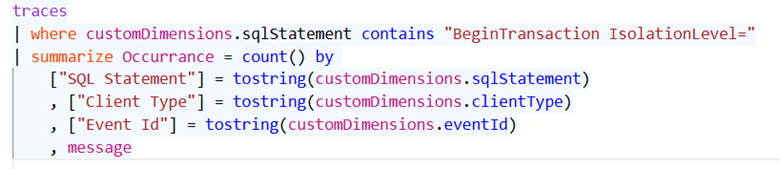
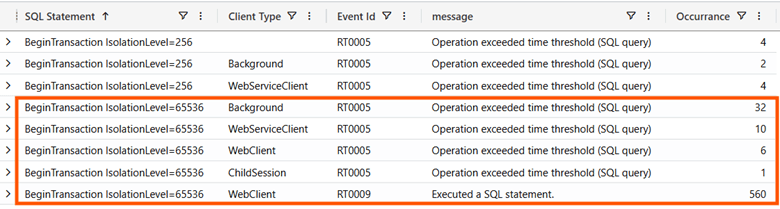
It is obvious that the number of occurrences is irrelevant since it may vary from environment to environment. What is important is that it is confirmed the transaction isolation level applied is RepeatableRead.
The ones with 256 (ReadUncommitted) comes from Web Service or job queue related Background client types (I believe even the scary ones without a Client Type and Session Id – brrrr -). You might verify what could be running behind the scenes of these sessions with the following KQL query:
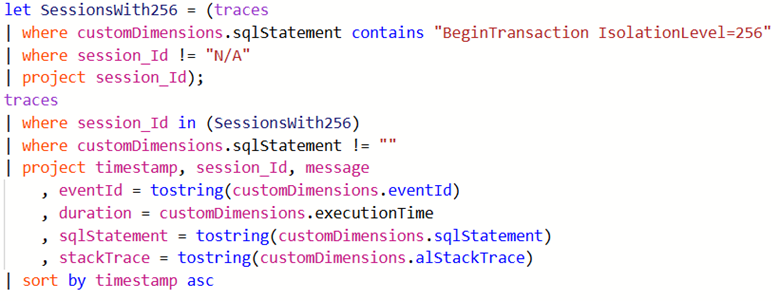
This just verify that they are mostly related in checking tables like Access Control or sort of.
CONCLUSION
If you were waiting for SQL Server 2025 to enable the Optimized Locking feature or thinking that Dynamics 365 Business Central Online transactions are already taking super advantage of this great feature, then sorry but (for now) generally NO:
- Optimized Locking feature needs ReadCommitted (4096) transaction isolation – or any row versioning-based isolation levels – to effectively work at its best
- Transaction isolation in NST connection and their client sessions are typically set to RepeatableRead (65536)
Hence, sorry but Optimized Locking feature won’t kick in its full potential with almost all the typical Dynamics 365 Business Central transactions.
Little poke – and provoke – on the product group shoulder.

Why not open to a more optimistic default transaction isolation level as per typical Azure SQL default (ReadCommitted) instead of RepeatableRead? I swear (and sweat) that it would be yet another Armageddon version of Dynamics 365 Business Central.

 Dynamics 365 Business Central tales, myths, legends. And something serious.
Leave a comment