
January is always funny to me. All the fun comes from basically two babies: go-lives – typically starting from the 2nd week of January – and closing year activities.
In this marasmus, I have fumbled in a single long running report. In SaaS, of course.
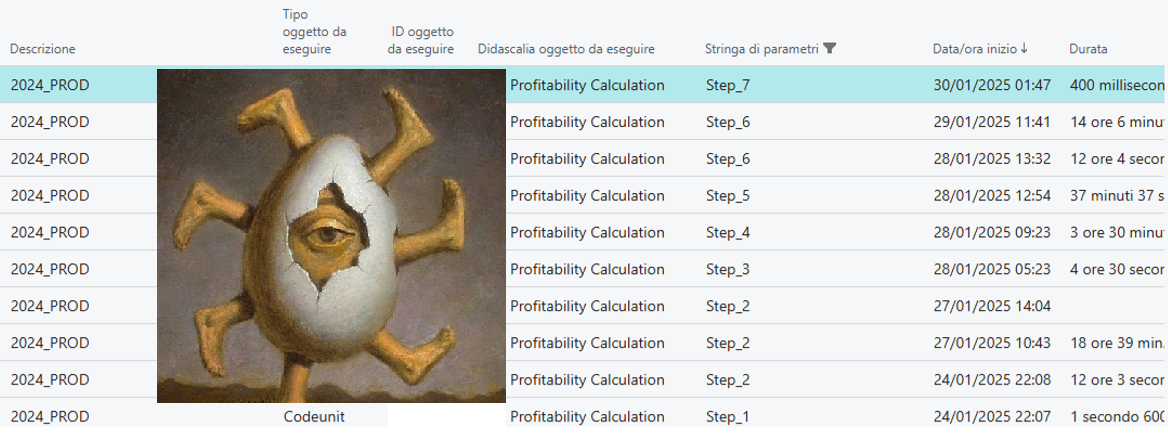
This report has been a robust beastie for more than a decade and its job is to calculate profitability. It takes values from many different sources and combines them together in a delicate mix of clever data retrieval and art (mainly pop art, with a touch of surrealism).

It is an independent sequence of data retrieval and calculations that, without going into details, can be resumed in the following milestone methods:
InitAnalysis();
UpdateSales();
UpdateSalesWithoutInventory();
CreateDriverValueForSales();
UpdateDirectCost();
UpdateIndirectValues();
TransformValues();
When dealing with large “exotic” customers (imagine a super big retail with a huge number of records on the sales tables and value entry, for example), it is possible that you hit the inevitable: a report timeout.
"cancelReason": MaxTimeExceeded,
"cancelReasonMessage": The operation was canceled because it took longer to complete than the specified threshold (12:00:00).,
"serverExecutionTime": 12:00:03.8084107,
"totalTime": 12:00:03.8084107,
"sqlRowsRead": 37250782,
"sqlExecutes": 14815310,

If you do not know, reports can run maximum 12 hours in SaaS. This is an operational limit. Period. Over and out.
Operation Limits in Dynamics 365 Business Central – Business Central | Microsoft Learn

So that, this report comes into my plate after several typical self-optimizations (setloadfields, avoid useless loopy reads, sacrifice a chicken, light a candle during the planet alignment, etc.).
I must admit that it was a bit complicated for me. Probably, I had to check my horoscope in advance.
Touching such complex calculations reminded me of playing Mikado, so better look at that like a Vermeer paint; whispering and mumbling how beautiful, distant and precise it is. – In the meantime, getting a slice of yummy pizza. –

Cut the crap. How to tackle that?
First: decouple. (Like Romans said: “Divide et impera”).

The big report monolith was divided into 7th distinct process, in this way we gained:
- Operational limits valid for each single process and not for the big mambo jumbo (more time)
- Persistent intermediate values. If one of the steps failed, it is possible to continue from that step going forward.
No news in that? Ah. The trick here was to create a Job Queue exactly at the end of each process to spawn up the subsequent one. So when the first step is over, it creates a new job queue that runs step 2, and so on and so forth. Something like that:
trigger OnRun()
    var
        ProfitabilityCalculation: Codeunit "EOS C/IN Update";
        CAAnalysisCode: Record "EOS C/A Analysis Code";
    begin
        if Rec."Parameter String" <> '' then begin
            CAAnalysisCode.Get(CopyStr(Rec.Description, 1, 20));
            case Rec."Parameter String" of
                'Step_1':
                    begin
                        ProfitabilityCalculation.InitAnalysis(CAAnalysisCode);
                        CreateNextJobQueueEntry(CAAnalysisCode."EOS Analysis Code", 'Step_2');
                    end;
                'Step_2':
                    begin
                        ProfitabilityCalculation.UpdateSales(CAAnalysisCode);
                       CreateNextJobQueueEntry(CAAnalysisCode."EOS Analysis Code", 'Step_3');
                    end;
                'Step_3':
                    begin
And this was pure surrealism (Magritte, probably).
Believe it or not. It was not enough.
The second – the longest – step continue running into timeout after 12 hours. Darn!
Oh wait, we do not need a single report to run anymore but we have a series of codeunit execution. And Codeunits do not have any explicit timeout.
So, the next and last step was simply to elevate / double the job timeout to 24 hours, with something similar.
      procedure CreateAndOpenJobQueue(ScenarioCode: Code[20])
    var
        JobQueueEntry: Record "Job Queue Entry";
        JobTimeout: Duration;
    begin
        CreateJobQueueCategory();
        JobTimeout := 24 * 1000 * 60 * 60; // 24 hours
        JobQueueEntry.SetRange("Object Type to Run", JobQueueEntry."Object Type to Run"::Codeunit);
        JobQueueEntry.SetRange("Object ID to Run", Codeunit::"EOS Profitability Calculation");
        JobQueueEntry.SetRange("Job Queue Category Code", JobQueueCategory);
        JobQueueEntry.SetRange(Description, ScenarioCode);
        JobQueueEntry.SetRange("Parameter String", Step1Parameter);
        if JobQueueEntry.IsEmpty() then begin
            Clear(JobQueueEntry);
            JobQueueEntry.Init();
            JobQueueEntry.Validate("Object Type to Run", JobQueueEntry."Object Type to Run"::Codeunit);
            JobQueueEntry.Validate("Object ID to Run", Codeunit::"EOS Profitability Calculation");
            JobQueueEntry.Validate("Job Queue Category Code", JobQueueCategory);
            JobQueueEntry."Job Timeout" := JobTimeout;
            JobQueueEntry."Parameter String" := Step1Parameter;
            JobQueueEntry."Recurring Job" := false;
            JobQueueEntry."Run in User Session" := false;
            JobQueueEntry.Description := ScenarioCode;
            JobQueueEntry.Status := JobQueueEntry.Status::"On Hold";
            JobQueueEntry.Insert(true);
        end;
Like in Dante’s Divina Commedia: we get out from this hell. “e quindi uscimmo a riveder le stelle..”.

Below the single timings, just to give you an idea how far we pushed that.
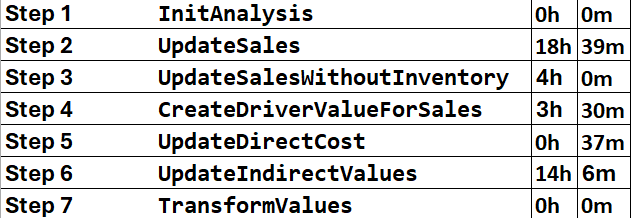
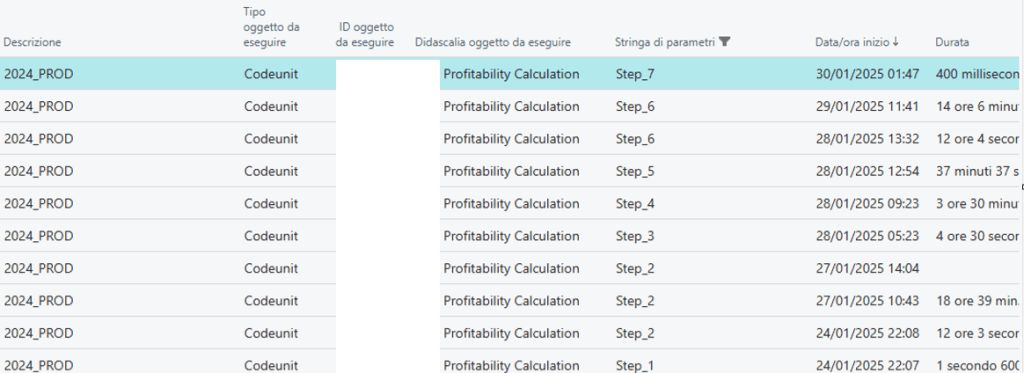
The longest step took 18+ hours. Can you imagine that?
I have a bittersweet feeling from this experience. I’m happy to make it in the end with this stretched SaaS scenario but not proud about timings. In the end, the overall process took approx. 41 hours, and it was like pushing an elephant in a garage.
It is true that this is a single long shot to take once or twice per year but still there are plenty of possibilities to make it more efficient.
All in all, that wasn’t a fairy tale for babies with a perfect happy ending, but it worked out like a charm.
CONCLUSION and TAKEAWAYS
- DECOUPLE. Break your monoliths as much as possible into smaller, more manageable, single processes. Baby processes are the perfect pairings with the cloud paradigm. Ah. Do not forget to instrument each of them with telemetry signals.
- SAVE STATES. Handle every single process like an intermediate steady state and continue from that, if the process interrupts. This will save a lot of time and avoid lengthy rollbacks. It will protect you also from a last-minute complete rollback due to any of the improvised and/or unexpected Microsoft platform or hotfix updates.
- CHANGE TIMEOUT. In stretched scenarios, the default timeout might not be your best friend in such long processes. Be aware of the operational limits with SaaS since these strongly define and limit your maximum time window.
 Dynamics 365 Business Central tales, myths, legends. And something serious.
Leave a comment