

Back from Directions EMEA 2024 in Wien, I had the time to pack up the performance enhancements included in Dynamics 365 Business Central 2024 Wave 2 (v25).
Like in the previous edition: my blog, my rules. It will be a 3 blog post squeezed into one.
These are my fav ones, based on their importance / added value. They represent to me the value to upgrade, just considering the performance aspect.
Gold: Modern Search (Full-Text Search)
Silver: Allow multiple users to post Warehouse Entries at the same time
Bronze: Analyze performance using scheduled profiles

Modern Search (Full-Text Search)
First mantra of the day:
“SEARCHING IS NOT FILTERING”

Two different things, and different mindsets.
Search might span into different columns while WHERE operator needs to specify which field you want to filter. I guess it is under the sun that filtering could be faster than searching.
With version 25.x, Dynamics 365 Business Central open the doors to a “Modern” search. Well, Modern… This is based on a feature dated back 15+ years, since SQL Server 2008 (SQL 10.0). I would have called that “Mature” search, instead (mmmm…. Maybe this name is not so adequate, it smells like some site category, and that is probably the reason why it was called Modern).
But don’t speculate about names, these are just coffee-machine conversations.
Full-Text search is a mature (oh… again. Not that word. Bad guy…) and robust service implemented since decades.
You might notice that also System Requirements have been changed and now include the following:

As you can see, there is the need of deploying and configuring another service on-premise (no worries, this is just a free of charge side feature of SQL Server).
In both Online and on-premise environments, to be able to use the Modern Search feature, you also have to enable it in the feature management page (it is enabled by default in new online environments while needs to be opt-in for updated ones)

Where can you use the modern search?
List, Lookups (and this is super-duper in sales orders!) and data search.
Is this worthed? YEAH, absolutely.
Is it safe for me to switch to Modern Search? Really are you asking me this? Wise guy. The answer is “YES but…”.
But you have to be sure that your desired searching field are part of the catalog.
Which fields are part of the catalog? Really are you asking me this, again? Wise guy.
Well, if you are on-premises, you might have noticed a new shiny object in the storage section in SQL Server Management Studio (SSMS) called bc_ft_catalog.
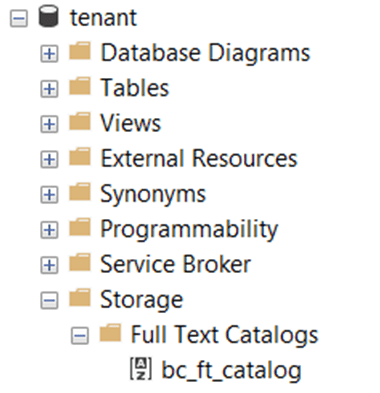
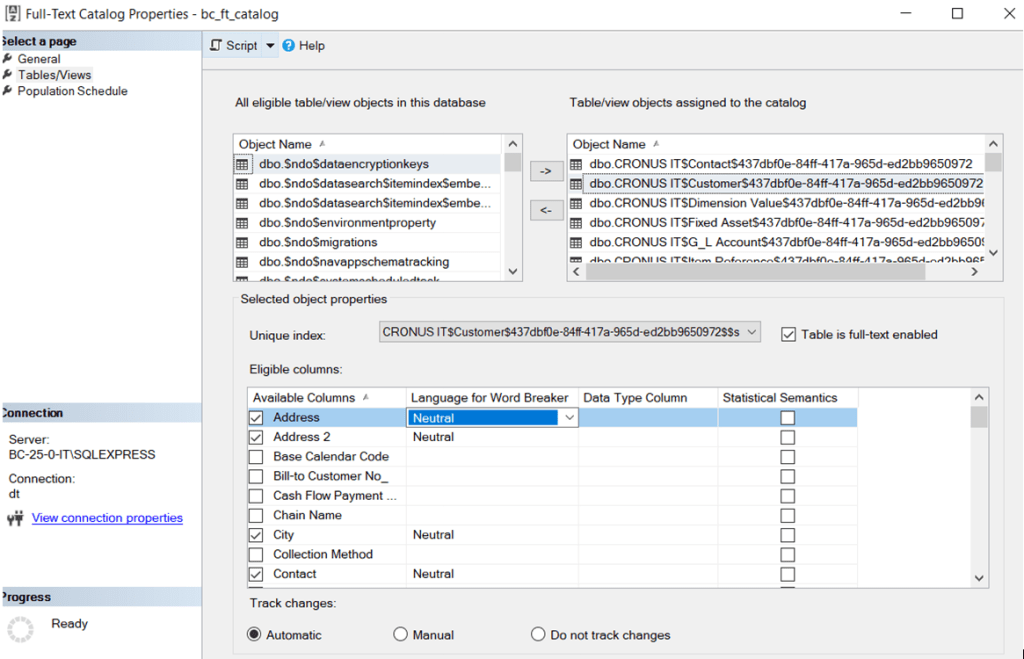
This baby here is the (nobody’s) diary (I have always loved Yazoo) of all the items (fields) indexed for text based search. And in the Table/Views section, you can see what and how have been indexed and consequently can be “searched”.
Another question..?. Wise guy… But also a bit too much pretending.
I would suggest you invest your money in this evergreen book, if you want to know more about it (at E-bay, it is quoted about 30/50$, or sort of)
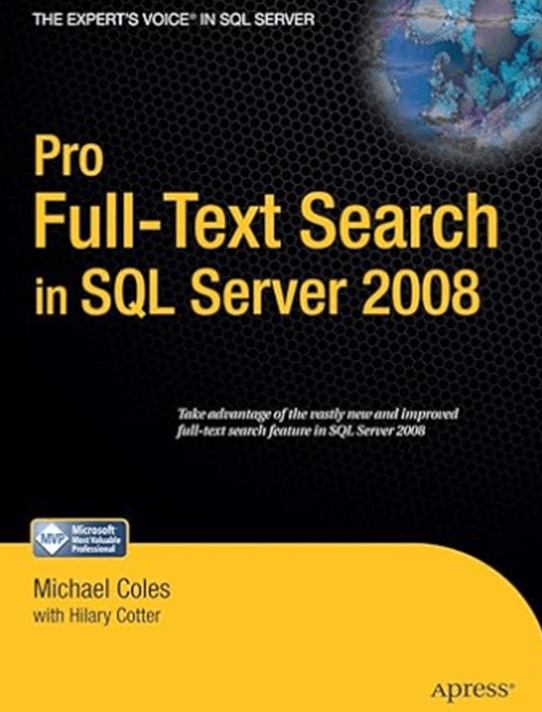
Have you already booked your copy? Attaboy! But you must read it. It is not meant to fix your unsteady table (if you have purchased a second-hand copy, probably it comes from a fix of an unsteady table).
And this is the performance booster #1 added in Dynamics 365 Business Central 2024 Wave 2 and you could also get more info in this official video, directly from the source:
What’s new: Data search improvements (for developers)
One thing that is currently missing, at least to me, is that you cannot turn this on/off in a Table Extension. In other words, it is not an extensible property. And this is strange to me. You can create tons of indexes but you cannot add a field into a catalogue and, as of now, you have to request the extension publisher to add OptimizedForTextSearch = true in their app (or your own apps, of course).
It is obvious that also the reverse, setting OptimizedForTextSearch to false, would be great (this would mean more control on which field to search, less field in the catalogue, etc.). But this reflection goes hand-in-hand in the dream of having one day the capability of disabling indexes.
Last but not least, if you want to implement this feature – and I am sure you will – remember that it is also based on indexes and if you are on-premise (still a thing) you have to deal with the catalogue maintenance. I have personally find out quite useful the following article:
sql server – Guidelines for full-text index maintenance – Database Administrators Stack Exchange
If you are running this feature in SaaS, you are walking on green grass: you do not have to take care of it, Microsoft will do that and when it is needed.

Allow multiple users to post Warehouse Entries at the same time
At Directions EMEA 2023 in Lyon, in one of the various interesting sessions, I have asked why we must have a locking assignment of Entry No. in non-fiscal tables (e.g. Warehouse Entry, Item Ledger Entry, etc.). Having a progressive and consecutive number is not a mandatory requirement, it is just an old technical implementation. The old biased refrain “… because we used to do like this”.
Frankly, I do not know if this was the trigger to review the old implementation or Microsoft had that already in pipeline, and honestly I am not truly interested in knowing it.
What counts most is that with Dynamics 365 Business Central 2024 Wave 2 there is a small change with a big impact on concurrency when posting warehouse entries.
“A small step for man a giant leap for mankind” someone would say.
As usual, in new online environments, this feature is already enabled in “Feature Management” page while you have to opt-in if you are upgrading from earlier versions.

In my company practice, this is a feature that we will try to uptake as soon as possible.
Well, in the new projects that will start next year we already have that opt-in left unchanged while in existing ones, there might be sometimes a bit of reworking in some exotic Per Tenant Extensions (PTEs). No rocket science, tough. AppSource apps are tested, validated, sealed and delivered with a big compatibility for this feature timestamp.
BYO popcorn and watch this video about this new featured change, again directly from the source:
What’s new: Concurrency in Warehousing
If you are using NumberSequence AL object or “Sequence No. Mgt.” Codeunit, the implementation is quite simple, and I am not surprised that it has been quite easy for Microsoft to commit these changes. See below the InsertRecord in the Warehouse Entry table with Dynamics 365 Business Central 2024 Wave 2:
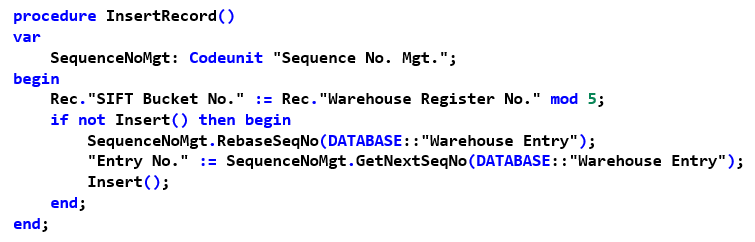
However, there is really a tricky part here: that damn SIFT Indexes (or, in SQL-ish, Indexed Views).
You can see number sequence as a giveaway ticketing system that provides a ticket or a bunch of them – a range – no matter weather it is used or not. When you are receiving your ticket number “for free” (read no locks, no blocks else no shocks), it is time for the application to insert the record.
In the old legacy way, concurrency was not existing and you have to (more or less) patiently wait to receive your progressive number from the locking ticketing office, do the post, goodbye, who’s next in line to receive the next ticket?… and so on and so forth. It could have been considered a serialized posting.
But now, the NumberSequence ticketing office might be seen with infinite office counters that are releasing numbers at the speed of light. Hence there might be multiple transaction posting and inserting records at the same time.
Let’s analyse the concurrent INSERT, then. The Primary Key is fulfilled (Entry No.) with the number from the sequence, indexes can be updated with no problem… what’s in the list of the DML event? Indexed Views. Uh-Oh…
Are you asking why Uh-Oh? I have a long and short answer for you.
The long answer: it should be another blog post; but it is quite well explained in details by Tine Staric here:
Curious case of Insert Lock Timeouts
The short answer: an Indexed View can be seen as YAT (yet-another-table) hence it will lock the needed records when inserting values.
This means that if you and I are inserting warehouse entries and this feature is enabled, we might end up writing in the database at the same time hence we could generate deadlocks due to the Indexed View(s) update.
And Microsoft is aware of that. And already used code to mitigate this problem that might arise in really high concurrency scenarios. See this strange line right before the Insert?

Mmm… maybe you understand it better, looking at one of the AL keys that implement a SIFT in the Warehouse Entry table

If me and you are inserting a warehouse entry with the same item, bin and location… Booom. But no. This (most likely) won’t happen because with good chances we have a different SIFT Bucket No. and we will update the records at different places based on that different Bucket No.
This is a damn flash of genius. Chapeau.
It is trivial to say that if you have added other SIFT in Warehouse Entry as Table Extensions, I would strongly suggest you change them in the very same way, by adding the “SIFT Bucket No.” field, before enabling this feature.
WHY IS THIS SO IMPORTANT?
Because Microsoft most probably will not stop with that. YESSS!
What might happen after? Which tables could be the next?
Item Ledger Entry and Value Entry?…
I truly, madly, deeply hope so since THIS would *really* be a historical change, like the man on the moon.


Scheduled Profiles
In other words, a self-service profiler for consultants and – overall – support. Good to know that now there could be something more than the typical “it is slow”, “it crashes sometimes” from customers…
AH! It happened to you as well??? Same people, same boat.
Back to what we used to have, the In-Client Profiler is easy to use but generates an output in Sindarin (Elves dialect) that needs you to wake up developers for translation to human beings. Also worth mentioning that requires a web interaction (developers can barely talk, imagine how happy they are …), therefore non-interactive session like background or web services are out of the equation.
This profile scheduling is something that could be munched by customer IT departments together with filling the non-interactive session analysis gap. Of course, it won the bronze medal not only because it is super simple and lovely.
At my sessions about Page Scripting Tool at Directions EMEA I have also prepared a simple YAML file to setup scheduled profiles finger snap. But I had no time to showcase that (or did I? … I do not remember, honestly, I was in presenting-trance mode).
Imagine that. You give a YAML file to someone (and with someone I really mean anyone) and you tell this anyone/entity how to run it in a couple of clicks. And finish.
Something like the following:
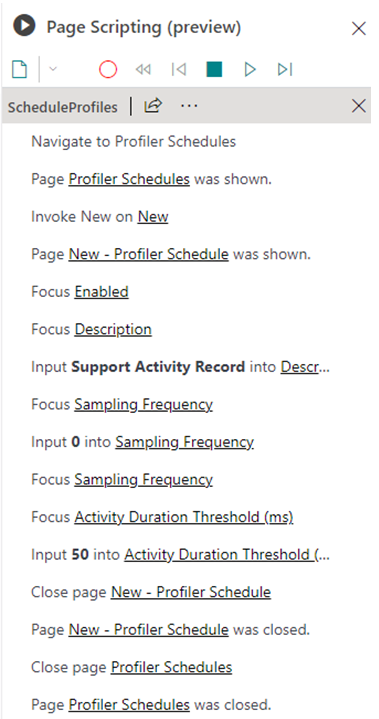
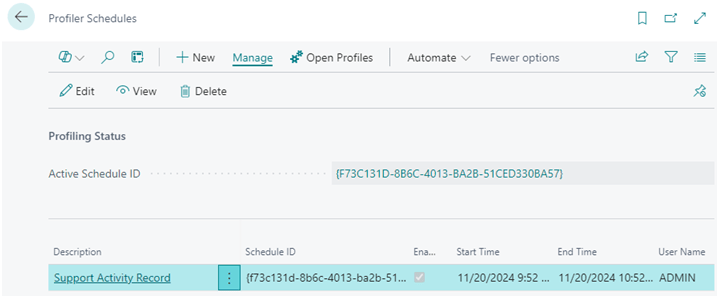
And after running that one, go to “Profiler Schedules”, et voilà. The Active Schedule ID with description “Support Activity Record” is the one that is currently running.
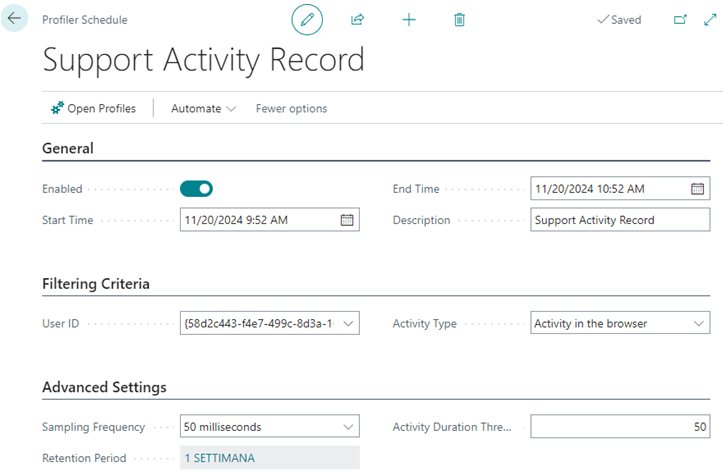
And these are the parameters for this profiler schedule.
If you have performed already some activities in the client and click on “Open Profiles”, it will show up the list of activities that you can slice & dice using Analysis view (you can even create your own views with Copilot) or simply use Open in Excel and continue your analysis from there or send it over to your support or Microsoft support or whoever support you or at least tries to.

There is more. Clicking on Start Time, it will trigger the analysis of the profile object within the client, like you have just run an in-client profiler trace.
And if this is not enough – it WILL NEVER BE enough for support –, from the “Performance Profiles” page, just click on “Download” and you will have again the Sindarin in-client profiler at hands to give away to developers, performance specialists or other elves from your realm.

NOTE: Hey… come closer…. Don’t tell anybody. Only me and you… This last download action could also be automated with page scripting tool, with another YAML file, so that users just have to send the file from the download folder.
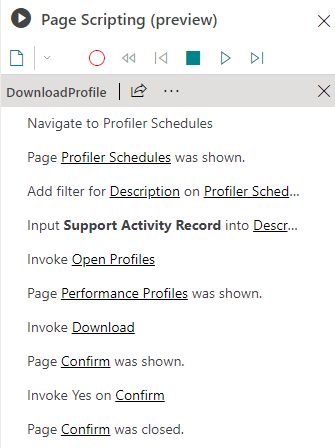
And everything with just one YAML file (or two) and few instructions.
How cool (and useful) is that?
I am pretty sure that in real life scenarios, the combination of Page Scripting + Scheduled Profile will be able in the future to make it troubleshooting… Magic.
Well deserved Bronze medal for this shiny new troubleshooting tool (better say, feature).
JUST FEW DODGEBALL RULES to remember:
- You cannot debug (normal or snapshot) if there is a profiler schedule running for that session. – C’mon do not pretend too much… –
- Profiler collections is adding a dead weight (platform overhead) to the current session activity, therefore it might affect performance for that user session that is being profiled. Disable it, when not needed.
And that is all for this release. Have fun and love you all.

“… anche quando poi saremo stanchi, troveremo il modo…”
 Dynamics 365 Business Central tales, myths, legends. And something serious.
Leave a comment