

In SaaS, when moving from one cluster to another, an innocent token from an ISV app is renewed in a setup table.
UPDATE "SQLDATABASE".dbo."CURRENTCOMPANY$EOS069_03 Sharepoint Setup$xxx" SET "Latest Token"=@0,"Token Expiration UTC"=@1,"$systemModifiedAt"=@2,"$systemModifiedBy"=@3 OUTPUT inserted."timestamp" WHERE ("Primary Key"=@4 AND "timestamp"=@5)Everything is fine. You are marching on your daily business and suddenly you see the lock timeout bullets flying.
GET COVERED!!! There is a sharpshooter. STAY PUT!

How do you find its nest? There are a couple of places where you could/should look at.
First and foremost: Telemetry (of course).
With signal RT0012, you can see the number of lock timeouts per timestamp buckets (e.g. every 5 minutes)
let _startTime = datetime(2024-10-15T07:46:22Z);
let _endTime = datetime(2024-10-15T08:46:22Z);
let _aadTenantId = 'YourEntraTenantId';
let _EnvironmentType = ‘Production’;
let _environmentName = 'YourEnvironmentName';
traces
| where timestamp between (_startTime .. _endTime)
| where customDimensions.aadTenantId has_any (_aadTenantId)
| where customDimensions.environmentType has_any (_EnvironmentType)
| where customDimensions.environmentName has_any (_environmentName)
| where customDimensions.eventId == 'RT0012'
| summarize count() by bin(timestamp,5min)
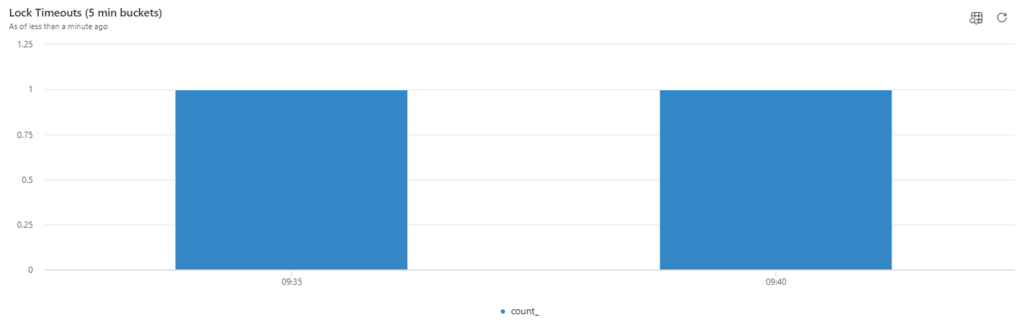
And also the detail related to who received the lock timeout.
let _startTime = datetime(2024-10-15T07:46:22Z);
let _endTime = datetime(2024-10-15T08:46:22Z);
let _aadTenantId = 'YourEntraTenantId';
let _EnvironmentType = ‘Production’;
let _environmentName = 'YourEnvironmentName';
traces
| where timestamp between (_startTime .. _endTime)
| where customDimensions.aadTenantId has_any (_aadTenantId)
| where customDimensions.environmentType has_any (_EnvironmentType)
| where customDimensions.environmentName has_any (_environmentName)
| where customDimensions.eventId == 'RT0012'
| extend sqlStatement = tostring(customDimensions.sqlStatement)
    , stackTrace = tostring(customDimensions.alStackTrace)
    , alObjectName = tostring(customDimensions.alObjectName)
    , extensionName = tostring(customDimensions.extensionName)
| extend
   alObjectId = customDimensions.alObjectId
  , companyName = tostring(customDimensions.companyName)
  , clientType = tostring(customDimensions.clientType)
  , alObjectType = customDimensions.alObjectType
  , extensionVersion = customDimensions.extensionVersion
  , extensionInfo = strcat(extensionName, ' ', customDimensions.extensionVersion,
    (iff(isnotempty(tostring(customDimensions.extensionPublisher)), strcat(' - ', tostring(customDimensions.extensionPublisher)), '')))
  , extensionId = customDimensions.extensionId
  , sqlServerSessionId = customDimensions.sqlServerSessionId
  , snapshotId = tostring(customDimensions.snapshotId)
| project timestamp,
    ["Session ID"] = session_Id,
    ["Client Type"] = clientType,
    ["AL Object Info"] = strcat(alObjectType, ' ', alObjectId, ' - ', alObjectName),
    ["Extension Info"] = extensionInfo,
    ["AL Stack Trace"] =  stackTrace,
    ["SQL Statement"] = sqlStatement,
    ["SQL Session Holding Lock"] = sqlServerSessionId,
    ["Snapshot ID"] =  snapshotId


Correlating the lock timeout with the lock snapshot signal RT0013, it might be possible to get to the sniper’s nest (AL Session that is holding the lock).
let _startTime = datetime(2024-10-15T07:46:22Z);
let _endTime = datetime(2024-10-15T08:46:22Z);
let _aadTenantId = 'YourEntraTenantId';
let _EnvironmentType = ‘Production’;
let _environmentName = 'YourEnvironmentName';
let Timeouts = traces
| where timestamp between (_startTime .. _endTime)
| where customDimensions.aadTenantId has_any (_aadTenantId)
| where customDimensions.environmentType has_any (_EnvironmentType)
| where customDimensions.environmentName has_any (_environmentName)
| where customDimensions.eventId == 'RT0012'
| extend sqlStatement = tostring(customDimensions.sqlStatement)
    , stackTrace = tostring(customDimensions.alStackTrace)
    , alObjectName = tostring(customDimensions.alObjectName)
    , extensionName = tostring(customDimensions.extensionName)
| extend snapshotId = tostring( customDimensions.snapshotId )
| project snapshotId, timestamp
, ["AL Object Type"] = customDimensions.alObjectType
,["AL Object Id"] = customDimensions.alObjectId
, ["AL Object Name"] = alObjectName
, ["AL Stack Trace"] = stackTrace
, ["AL Execution Method"] = customDimensions.alExecutingMethodScope
, ["Extension Name"] = customDimensions.extensionName
, ["Extension Version"] = customDimensions.extensionVersion
, ["User Telemetry Id"] = case(
  	toint( substring(customDimensions.componentVersion,0,2)) >= 20, user_Id
, 'N/A'
);
Timeouts
| join (traces
| where customDimensions.eventId == 'RT0013'
| where timestamp between (_startTime .. _endTime)
| where customDimensions.aadTenantId has_any (_aadTenantId)
| where customDimensions.environmentType has_any (_EnvironmentType)
| where customDimensions.environmentName has_any (_environmentName)
| extend sqlStatement = tostring(customDimensions.sqlStatement)
    , stackTrace = tostring(customDimensions.alStackTrace)
    , alObjectName = tostring(customDimensions.alObjectName)
    , extensionName = tostring(customDimensions.extensionName)
| extend snapshotId = tostring( customDimensions.snapshotId )
| project snapshotId
, alObjectTypeHoldingLock = customDimensions.alObjectType
, alObjectIdHoldingLock = customDimensions.alObjectId
, alObjectNameHoldingLock = alObjectName
, alStackTraceHoldingLock = stackTrace
, alExecutionMethodHoldingLock = customDimensions.alExecutingMethodScope
, sqlTableLocked = customDimensions.sqlTableName
, sqlLockResourceType = customDimensions.sqlLockResourceType
, sqlLockRequestMode = customDimensions.sqlLockRequestMode
, sqlLockRequestStatus = customDimensions.sqlLockRequestStatus
, sqlServerSessionId = customDimensions.sqlServerSessionId
, alSessionIdHoldingLock = customDimensions.sessionId
, extensionNameHoldingLock = extensionName
, extensionVersionHoldingLock = customDimensions.extensionVersion
, clientTypeHoldingLock = customDimensions.clientType
)
on$left.snapshotId == $right.snapshotId
| order by snapshotId
| project-away snapshotId1

And we have found the sharpshoother! (Sql Server Session 159, AL Session Id 125768)


Another way to find out the SQL Session that is holding the lock (but missing the important part: AL Session Id) is the Database Locks page in the client:

Just for your curiosity, if you open Page Inspector on the Database Lock record (CTRL+ALT+F1), there is also another field that might be useful (but only with On-Prem deployments) called “Transaction Id“.
…We are a few inches away from stopping this, now that we know the AL Session Id from Telemetry signals correlation.
In the Tenant Admin Center, select the environment and click on Sessions. And locate the AL Session Id
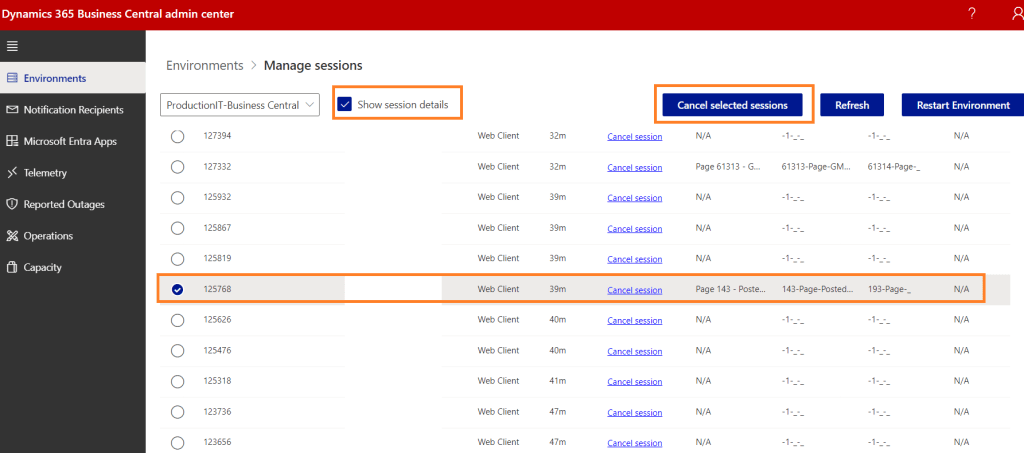
Steady, Steady… “let not my enemies triumph over me”...

Cancel Session…


… “We got him! Stay down”.
CONCLUSION
If you want to find out and kill the sharpshooter (the AL Session Id that caused / is causing lock timeoutS) you have to;
- Look in telemetry for RT0012 Lock timeout signal.
- Correlate in telemetry RT0012 Lock timeout with RT0013 lock snapshot, to find out the SQL Session holding lock, and AL Session Id related to it.
- [Optional] Run Database Locks page in the client to double check if the SQL Session holding lock matches the one in telemetry.
- Kill the AL session Id in the Tenant Admin Center
And now back marching, the path is clear.
 Dynamics 365 Business Central tales, myths, legends. And something serious.
Leave a comment