
Hello. This is a bit long post written in few days. I simply did not want to miss anything or let anything being misunderstood. I could rephrase this blog post anytime, if required.

INTRO
Dynamics 365 Business Central Online is the best in class Online ERP in the world for SMB market. And for 2 years in a row.

It is not me, “the last of the peppins” (In Italian: l’ultimo dei peppini), to declare it is just one of the most famous magazines in this segment (probably, “the first of the peppins”): FORBES https://www.forbes.com/advisor/business/software/best-erp-systems/
You may know more what is making this online service one of the Microsoft diamonds by taking your popcorn bin and watching these superb videos:
- Business Central Under the Hood episode 3: How many users can Business Central handle in the cloud?
- Microsoft Presents: Designing for scale in Business Central online
- Episode 334: In the Dynamics Corner Chair: BC Experience – Security, Scalability, and Updates
At the end of this lord of the ring’s trilogy, you might agree with me that nobody else on earth (and probably also in the Middle-Earth) could be able to create such a beauty. If you look back in the years, Microsoft added a vast plethora of capabilities such as copying a production environment, performing a Point In Time restore, moving an environment to a different tenant, up to the upcoming possibility of upgrading to a minor update of your choice. And the best is yet to come.
Another proof of this maturity is how Microsoft handle Outages and Refunds for missed services.
This blog post is just to share the positives and some negatives about these stingy topics. Yes, they are like sex: everybody does it but nobody talk about it.

First and foremost: IT incidents and unwanted downtimes could happen (and they happen) both in on-premises and online worlds.
When these happens on-premises, you and the customer are the only resources relying on rescue and recovery, while when these happens online, you have a peloton of super-skilled software engineers looking at resolving the issue in the shortest possible time.
Considering Dynamics 365 Business Central, I had the luck to know some of them personally, and I could only say that many times they leave me breathless by the amount of technical knowledge they have (of course… I still am the last of the peppins) together with their incredible attitude in retrospective and problem solving.
And this is just one of the reason why online incidents are quite rare and short in time and embrace the cloud, as much as you could.
This is not enough.
Microsoft is taking super seriously (close to paranoid) the stability of the online services and produces a Service Level Agreement (SLA) document that determines when, what and how to get refunded if one, or more, of its services are not available for some time.
Believe me, Microsoft is greatly accountable for that.
A REAL CASE
Last year, for a specific (“big”) customer online, we have worked hard in refactoring our own code together with requesting a 3rd party integration to be less aggressive with API consumption (B2C). This stabilization period started from July 2023 and progressed througout the end of September 2023.
Thanks to the available partner telemetry and a great cooperation between us, Microsoft and customer, we have been able to stabilize such environment performance up to Friday 6th October where it was reported by IT department that there have been no internal performance relevant tickets to their helpdesk. We considered that date a victory.
And right after, it goes the upgrade to v23 with 2 big performance goodies: from multiple JOIN to a single JOIN for table extensions and tri-state locking enablement. The wind was blowing on our side.
Then Murphy’s law kicked in:

Customer were hit in just one month (November 2023) by 3 Outages:
- 5h 5min (305 min) Dynamics 365 Business Central Outage 7th November 2023.
- 8h 52min (532 min) Power Platform Global Outage 16th November 2023 due to Power Platform connector issue.
- 2h 9min (129 min) Dynamics 365 Business Central Outage 17th November 2023.
The Power Platform Outage was global while the Dynamics 365 Business Central were “single” and only related to this environment – I will explain what this means later on, bear with me and eye on the ball -.
It is trivial to say that in November 2023 there have been quite a difficult situation and customer requested us to pursue Microsoft for a refund of a missed online service. That is fair, imho.
WHO IS ELIGIBLE FOR REFUND?
What defines the eligibility to be refunded is, of course, if you have a supported service. For example, sandboxes are never covered to a refund policy and the same happen for viral or non-paid production services (this last is obvious, you cannot ask to be refunded for something that you have not paid).
Secondarily, what defines the eligibility is the impact of the issue.
If users can connect but they have medium to severe performance problems, these are not covered as eligible. If a feature is broken like e.g. Job Queue or Power BI or Dynamics 365 connections, these are not covered as well in the request for refunds.
Microsoft used to call these “working in an unpaired manner”.
So… what the heck is Microsoft refunding, then?
Microsoft is mainly refunding the missed service utilization that is roughly like saying not being able to access that service at all. If you can access the service but you are almost unable to work with it because of huge performance problem, this will not be refunded as it is almost impossible to define a technical threshold and what to refund.
Not being able to access a specific service is typically associated with the term Outage.
GLOBAL AND SINGLE OUTAGE
An Outage could be resumed as an online service missed availability.
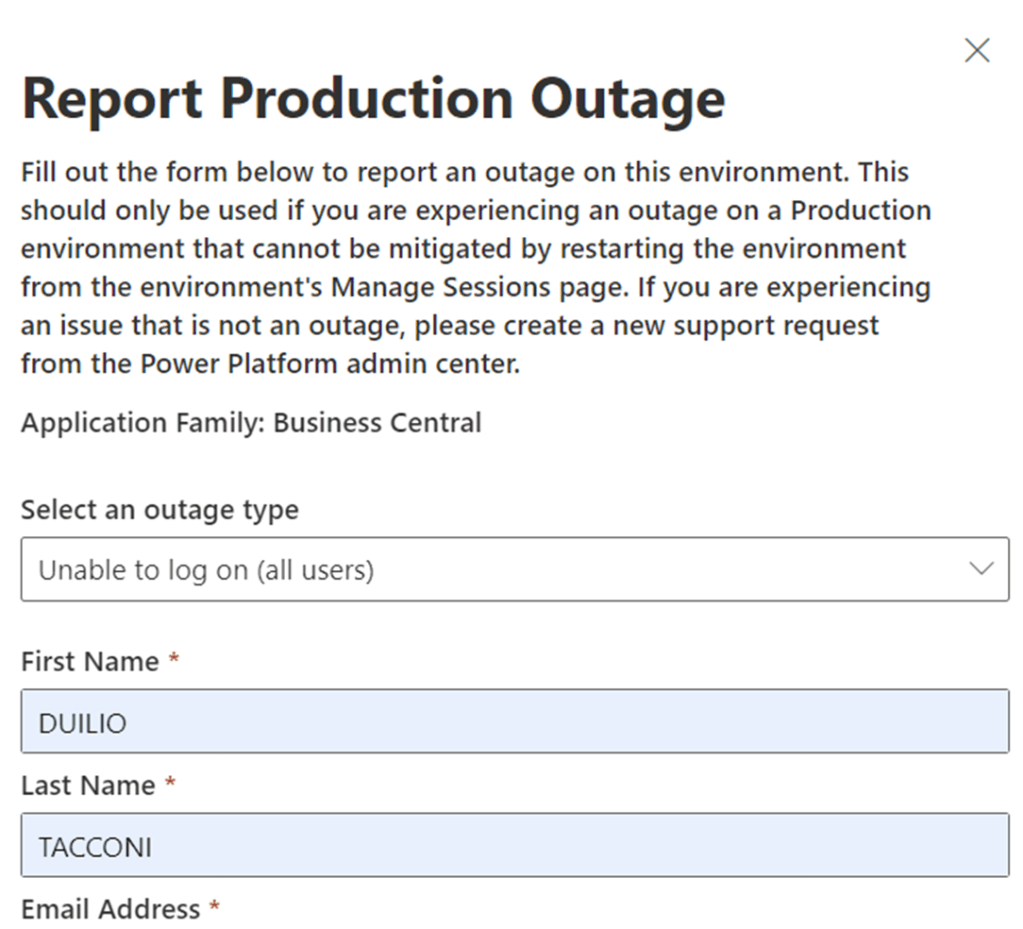
To declare an Outage in a Dynamics 365 Business Central environment is super simple and in Microsoft these are also called “Red Button” support request calls or just Red Buttons:
- Go to Tenant Admin Center
- Select the affected paid Production environment and click on “Support” then “Report Production Outage”
- Select which client is affected (Web Client or APIs or Other) and respond to the following questions:
- Have you tried a different browser? Which browsers have you tried?
- Are you able to log into any companies in this environment? Which companies are you able to log into?
- What errors are you seeing? Please include any correlation IDs.
- Select the date and time when the outage began.
- Click Report
Just one request, from the deep of the heart: do NOT abuse of it.
Push the Red Button ONLY when there are real Outages, in other words when users cannot REALLY access the environment with Web Client and/or APIs. Try other browsers, use incognito (in-private) browsing mode and analyze telemetry before flipping in the Outage coin.
Let’s now distinguish between Global Outages and Single Environment / Tenant / Cluster Node Outage with specific examples.
30th July 2024, there have been a Global Outage in the Azure Networking area that impacted all Microsoft services that were belonging to that. You might have noticed that by checking this link: https://azure.status.microsoft/en-us/status (add it to your favorites, if you haven’t already) at that time:
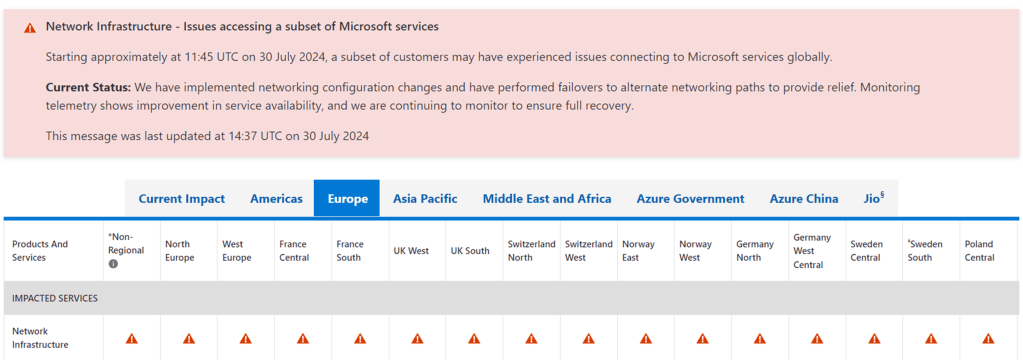
One of such services impacted was Dynamics 365 Business Central Online.
Global Outages are strictly following a specific internal process, and they are “transparent” to customers and partners since their evolution (start, progress and end status) is communicated in a timely manner through the Health center dashboard in the Microsoft Admin Center.
If you have been hit by this Global Outage, just navigate to https://admin.microsoft.com/#/servicehealth/history/:/alerts/DN842382
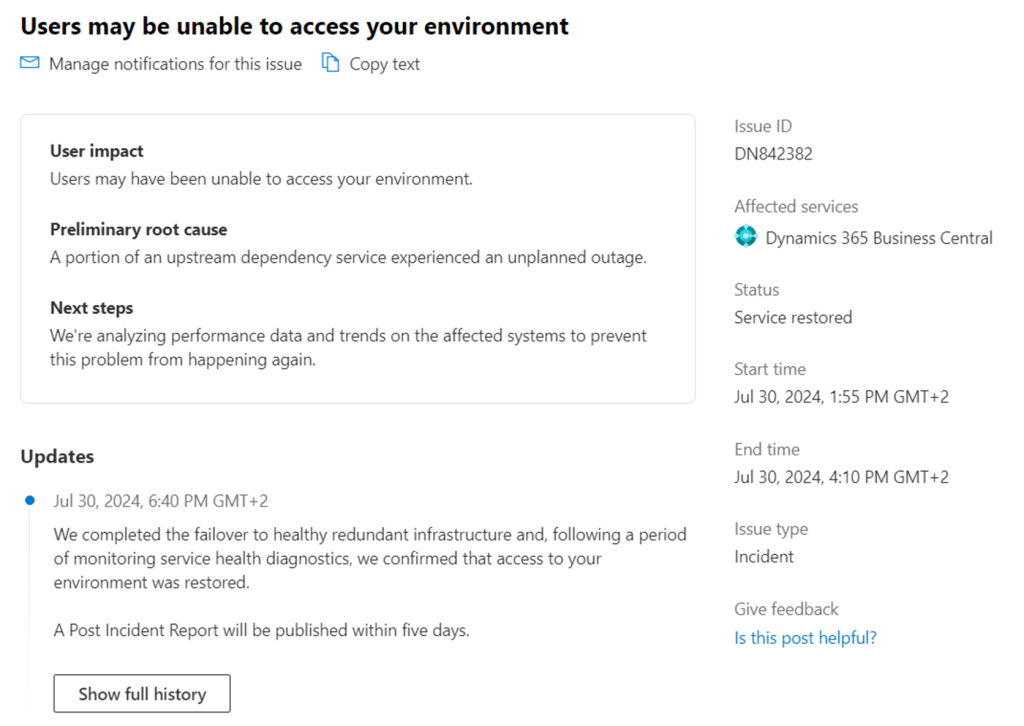
Global Outages for Dynamics 365 Business Central do have an automatic request for Root Cause Analysis (RCA) to the owning team that should be made available in few weeks from the end of the event (even 2 weeks). In this case it was reported 5 days (even tough, still there is no Post Incident Report produced by Product Group).
NOTE: do not pretend that Microsoft would reveal all tiny details about its microservices. RCA will be just few lines with the typical happy ending formula like “we are working to avoid this in the future…” or “we will make sure it won’t happen again..” or sort of.
Single Environment / Tenant / Cluster Node Outages (in other words: everything that is not a Global Outage) are, unfortunately, still typically not reported through Health center, despite being requested several times, in several places and by many partners and customers to Product Group.
Yes, you heard well. If your environment or tenant is the only one that is “down” for somewhat reason, or you are in an unfortunate busy cluster node and, because of that, for few hours you are not able to work, Microsoft will not create automatically any record nor provide you with an RCA in the Health center and the max that you could squeeze out from it is to open a support request or red button yourself to Microsoft and request to have these information through the support channel.
To me, this is a bit strange since the official Microsoft documentation is requesting partner to gather the Outage No. from Health Center (e.g. Issue ID: DN842382 considering the last global outage example) and this is then not valid for Single Environment / Tenant Outages.
I hope Product Group could improve the experience also within single specific cases with more transparency like it perfectly does with Global Outages. I know it might not be easy but, after all, a Global Outage is just a sum of Single Outages.
WHAT MICROSOFT REFUND
Service Level Agreements (SLA) for Microsoft online products are available at this link: https://www.microsoft.com/licensing/docs/view/Service-Level-Agreements-SLA-for-Online-Services . Download the one in your local language, if you like.
With Dynamics 365 Business Central, there is a monthly period refund on specific single event per product downtime. Right now, Microsoft will provide a refund if a single event per product is breaking the following service levels:
< 99.9% uptime: 25% of the monthly fee x user impacted
< 99% uptime: 50% of the monthly fee x user impacted
< 90% uptime: 100% of the monthly fee x user impacted
And the uptime is calculated using the following formula:
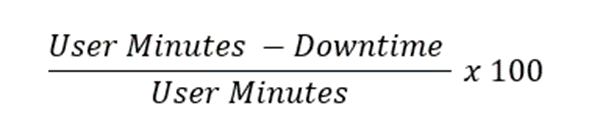
Attention! The devil is in the details.

Below some important points to remember if you intend to go for a request for refund.
- SINGLE EVENT.
One “mistake” that I did last November 2023, while requesting for refund, was to SUM both Dynamics 365 Business Central Outage time for the period.
305 min + 129 min = 434 min. downtime
And applying the formula:
((30 days * 24 hours * 60 minutes) – 434 min. downtime) / (30 days * 24 hours * 60 minutes) * 100 = 98.995%
This is equivalent to request for a refund for 50% of the service for the month for the impacted users since it is slightly lower than 99%.
But I have learned on my skin – with a very big surprise – that calculation must be done and repeated for SINGLE EVENT, like they are isolated.
In the end, Microsoft evaluated the 2 Outages as separated events and calculation performed singularly, thus breaking just the 99.9% SLA. This ended up in being eligible for refund of 25% for the monthly fee per user impacted.
As a paradox, you could be hit every day by e.g. 1.5 hours of stop every single day for 30 days and Microsoft will not consider you eligible for a full refund.
I deeply hope that this will be changed in the future and that the SUM of all events in a month would determine the refund level calculation and not the single ones.
- USERS IMPACTED.
If you are not using telemetry then, well, this is the right time to start getting used to it and determine e.g. the number of active users per hour per client type:

Microsoft will refund the entire service or only part of the service, based on the user connection (or missing connection).
My customer is a 24/7 and they work almost every day. If you consider that there is also a B2C service and several integrations, then you might assume the business continuity is a must.
One of the outages happened in the night and customer calculated the number of users impacted based on the nightshift workers.
Microsoft did not refund the total number of licensed users but the ones that really were attempting to connect and not making it. Or, at least, they should have enough internal telemetry to match what you are requesting.
In my case, the customer refund amount was considering only the user impacted and not all the licensed ones.
- PER PRODUCT.
Two different Microsoft products were hit during this period by different and independent root cause: Power Platform and Dynamics 365 Business Central. Every incident should be handled separately with a different request for refund and calculation per single product.
Within this specific case, I have created 2 separate requests for refunds: one to Power Platform team and another one to Dynamics 365 Business Central team. They followed 2 similar – but not the same – processes.
It is trivial to say – as per point 1. – if it is not possible to sum up downtimes for the same service, the same is valid also for different services.
I believe this is expected, but better write this down.
- BEFORE THE END OF NEXT MONTH.
If you are embarking on a request for refund, you need to gather everything that is requested and create the request before the end of the next month when the event happened.
In my case, it was November 2023, hence I had to submit the request before and not after 31st December 2023, otherwise it would not have been eligible for processing.
HOW MICROSOFT REFUND
This is duly written in the official documentation here: https://learn.microsoft.com/en-us/partner-center/billing/request-credit#service-outages-service-level-agreement-issues-credit
CSP / Partner should open a request for refund to Microsoft through Microsoft Partner Center
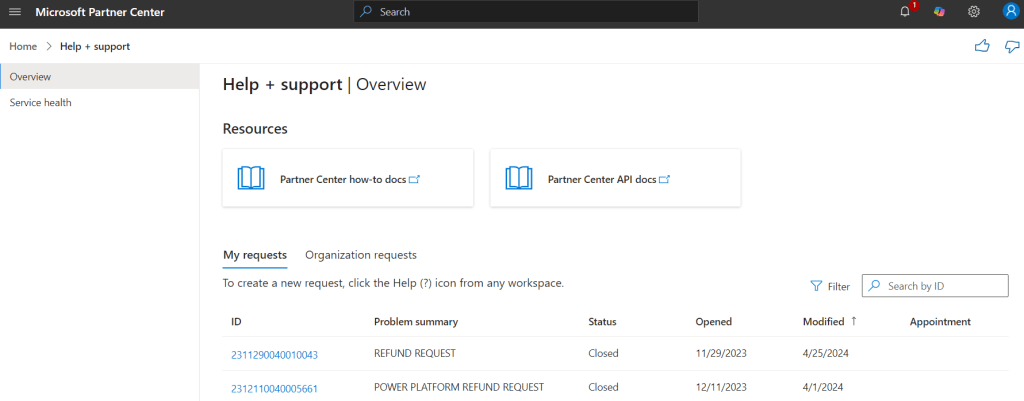
The support request must include a zip file with the following:
- Word Document: Request for Refund
- Outage Incident Number: (DNxxxx, you can take it from Health center if Global, otherwise specify that Dynamics 365 Business Central Online Product Group does not instantiate Outage Incident Numbers for single environment outages)
- Support Request Number: (yes, this is needed too. It could be either a normal support request or, preferably, a red button) and email / alias of the Support Engineer that handled the request.
- Customer email where it is requesting to be officially refunded for the missed service. It must be an email coming from Customer domain and it should contain the tenant ID, environment name and number of users affected.
- Monthly / Yearly Invoice paid in advance in PDF format
- (If the invoice is for multiple Microsoft Product) An XLSX extract of the single product monthly / yearly fee for whom you are requesting the refund.
- Detailed calculation of the amount to be refunded based on the official SLA.
And now it comes the (less) fun part.
The request for refund was created with all details provided by the end of November 2023. Almost every week, I was receiving the typical update email token from the local support, stating that it was a work in progress.
Guess what? Refund was credited by March 2024.

3+ Months pass-by for something that, to me, Microsoft could credit almost automatically or, at least, make it a simpler process for partner and customers.
And this is all I know about Outages and Request for Refunds. For now: I know, you know.
If you want to take this endeavor, be well prepared with a lot of patience ammunition. The whole process will take quite some time that nobody will give you back.
Rest assured that in all of its aspects, both Outage and request for refund service handling is super precise, meticolous and professional. And it is also obvious that Microsoft is fully committed in zero-ing the number and entity of Outages and downtimes, for a mutual convenience.
Are you able to guarantee and fulfill the same for your On-Premises customer? …
 Dynamics 365 Business Central tales, myths, legends. And something serious.
I may have some other comments, but I want to call out: You do not need to open a support request during the outage in order to claim a credit. In fact, please don’t!
LikeLike
Thanks for your comment, Tim. I believe I know what I am talking about, having worked 15 years in MS Support :-). I have gone through this process from both sides now: MS side and Partner side. Officially it is requested the SR Number (a normal one OR a red button – they are the same -) if you are eligible and want to instantiate a request for refund. Since who is handling the request for refund is normally a local outsourced person, they also request together with SR number also the alias of the support engineer who handled that. Below the official and legal proof of what I am writing https://learn.microsoft.com/en-us/partner-center/billing/request-credit#request-credit : “The support ticket number and details of customer contact regarding resolving service impact”
LikeLike